Command-line usage guide
rna-clique
rna-clique is the main executable of RNA-clique. Given some input
transcriptomes, rna-clique gets a genetic distance matrix quantifying
differences in the genomes of the provided samples.
Positional arguments
| Position | Config option | Description | Argument count | Type |
|---|---|---|---|---|
| 0 | input_dirs |
Directories containing the transcript FASTA files. | \(\ge 0\) | list[pathlib.Path] |
Options
| Config option | Long name | Short name | Description | Argument count | Type | Choices | Default value | Default value (flag only) | Required |
|---|---|---|---|---|---|---|---|---|---|
--input-config |
-c |
File from which to load configuration settings. | \(1\) | pathlib.Path |
OUTPUT_DIR/config.yaml |
No | |||
--show-config |
Display the computed configuration or arguments. | \(\ge 0\) | list[str] |
original_args, args, or config |
['config'] |
No | |||
--show-config-format |
Format for displaying computed config or arguments. | \(1\) | str |
dict, yaml, or json |
Depends on --show-config |
No | |||
--help |
-h |
Display a help message and exit. | \(0\) | No | |||||
verbose |
--verbose |
-v |
Print more output than usual. | \(0\) | bool |
False |
True |
No | |
top_genes |
--top-genes |
-n |
Number of top genes by k-mer coverate to select. | \(1\) | int |
Yes | |||
top_matches |
--top-matches |
-N |
Threshold for counting a match between two genes. | \(1\) | int |
\(1\) | Yes | ||
transcripts_name |
--transcripts-name |
-t |
Name of transcripts files in input directories. | \(1\) | str |
transcripts.fasta |
Yes | ||
top_genes_dir |
--top-genes-dir |
-O1 |
Directory containing top n genes by coverage. | \(1\) | pathlib.Path |
OUTPUT_DIR/od1 |
Yes | ||
tables_dir |
--tables-dir |
-O2 |
Directory containing gene matches tables. | \(1\) | pathlib.Path |
OUTPUT_DIR/od2 |
Yes | ||
transcript_id_regex |
--transcript-id-regex |
-p |
Python regex to use for parsing transcript IDs. | \(1\) | re.Pattern |
^.*cov_([0-9]+(?:\.[0-9]+))_g([0-9]+)_i([0-9]+) |
Yes | ||
evalue |
--evalue |
-e |
e-value threshold to use for BLASTn searches. | \(1\) | float |
\(1 \times 10^{-99}\) | Yes | ||
jobs |
--jobs |
-j |
Number of parallel jobs to use. | \(1\) | int |
THREADS - 1 |
Yes | ||
cache_dir |
--cache-dir |
-C |
Directory containing BLAST DB caches. | \(1\) | pathlib.Path |
OUTPUT_DIR/db_cache |
Yes | ||
graph |
--graph |
-g |
Gene matches graph. | \(1\) | pathlib.Path |
OUTPUT_DIR/graph.pkl |
Yes | ||
output_dir |
--output-dir |
-O |
RNA-clique analysis output root directory. | \(1\) | pathlib.Path |
No | |||
title |
--title |
-T |
Name to assign to the analysis. | \(1\) | str |
OUTPUT_DIR.name |
No | ||
keep_all |
--no-keep-all |
Do not keep all matches in case of a tie. | \(0\) | bool |
True |
False |
No | ||
--output-config |
-c2 |
File in which to store computed config after analysis. | \(1\) | pathlib.Path |
OUTPUT_DIR/config.yaml |
No | |||
matrix |
--matrix |
-m |
Output distance matrix location. | \(1\) | pathlib.Path |
OUTPUT_DIR/distance_matrix.h5 |
No |
Input format
This script's inputs are the transcriptomes to analyze.
Output format
The main output of this script is the distance
matrix. In the process of obtaining the distance
matrix, rna-clique also produces the top genes files,
gene matches tables, and gene matches
graph.
Examples
Run RNA-clique on the transcriptomes at sample1, sample2, and sample3.
RNA-clique expects that the transcriptome FASTA files for these samples are
located at sample1/transcripts.fasta, sample2/transcripts.fasta, and
sample3/transcripts.fasta, respectively. Select only the top \(5000\) genes by
\(k\)-mer coverage for each sample. Write output under rna_clique_out.
Run RNA-clique on the transcriptomes at sample1, sample2, sample3, and
sample4. Expect that the transcriptome FASTA files for these samples will be
at sample1/genes.fasta, sample2/genes.fasta, sample3/genes.fasta, and
sample4/genes.fasta, respectively. Use an \(e\)-value cutoff of \(1 \times
10^{-90}\). Dont' keep all matches in the case of ties when computing the gene
matches tables; split ties arbitrarily. Select the top \(10000\) genens by \(k\)-mer
coverage. Write the output gene matches graph to gene_matches_graph.pkl. Write
the output distance matrix to matrix.h5. Write the remaining output under
other_out.
rna-clique sample1 sample2 sample3 sample4 \
           -t genes.fasta --no-keep-all -n 10000 -O other_out \
           -g gene_matches_graph.pkl -m matrix.h5
build_graph
Build the gene matches graph from the gene matches tables.
Options
| Config option | Long name | Short name | Description | Argument count | Type | Choices | Default value | Default value (flag only) | Required |
|---|---|---|---|---|---|---|---|---|---|
--input-config |
-c |
File from which to load configuration settings. | \(1\) | pathlib.Path |
OUTPUT_DIR/config.yaml |
No | |||
--show-config |
Display the computed configuration or arguments. | \(\ge 0\) | list[str] |
original_args, args, or config |
['config'] |
No | |||
--show-config-format |
Format for displaying computed config or arguments. | \(1\) | str |
dict, yaml, or json |
Depends on --show-config |
No | |||
--help |
-h |
Display a help message and exit. | \(0\) | No | |||||
verbose |
--verbose |
-v |
Print more output than usual. | \(0\) | bool |
False |
True |
No | |
tables_dir |
--tables-dir |
-O2 |
Directory containing gene matches tables. | \(1\) | pathlib.Path |
OUTPUT_DIR/od2 |
Yes | ||
graph |
--graph |
-g |
Gene matches graph. | \(1\) | pathlib.Path |
OUTPUT_DIR/graph.pkl |
Yes | ||
output_dir |
--output-dir |
-O |
RNA-clique analysis output root directory. | \(1\) | pathlib.Path |
No | |||
--output-config |
-c2 |
File in which to store computed config after analysis. | \(1\) | pathlib.Path |
OUTPUT_DIR/config.yaml |
No |
Input format
The inputs for this script are the gene matches tables.
Output format
The output for this script is the gene matches graph.
Examples
Build a graph from tables in the RNA-clique analysis directory rna_clique_out.
Tables are expected to be under rna_clique_out/od2. The output graph will be
at rna_clique_out/graph.pkl.
Specify a directory containing tables and output graph destination explicitly:
export_and_search
Export orthologs from ideal components and search their sequences with BLAST.
This script combines functionality from export_graph and
search_ideal_components, but unlike those scripts,
this script can operate on multiple RNA-clique analyses and multiple queries at
once. The analyses for which to export and search ideal components can be
specified via their config files using the -C option.
Options
| Long name | Short name | Description | Argument count | Type | Choices | Default value | Default value (flag only) | Required |
|---|---|---|---|---|---|---|---|---|
--show-args |
Display the computed or original parsed arguments. | \(\ge 0\) | list[str] |
original_args or args |
['args'] |
No | ||
--show-args-format |
Format for displaying computed or original parsed arguments. | \(1\) | str |
dict, yaml, or json |
Depends on --show-args |
No | ||
--help |
-h |
Display a help message and exit. | \(0\) | No | ||||
--configs |
-C |
RNA-clique configs for which to export and search orthologs. | \(\ge 1\) | list[pathlib.Path] |
Yes | |||
--resolve-name-conflicts |
-r |
Resolve conflicting output filenames automatically. | \(0\) | True |
No | |||
--export-output-dir |
-X |
Output directory for exported sequences. | \(1\) | pathlib.Path |
Yes | |||
--jobs |
-j |
Number of parallel jobs to use. | \(1\) | int |
No | |||
--export-only |
-x |
Only export the orthologs; don't search. | \(0\) | True |
No | |||
--queries |
-Q |
FASTA files containing sequences to search in orthologs. | \(\ge 1\) | list[pathlib.Path] |
No | |||
--transcript-id-regex |
-p |
Python regex for parsing sequence IDs | \(1\) | re.<function compile at 0x7d7b6d2e3ec0> |
re.compile('^.*cov_([0-9]+(?:\\.[0-9]+))_g([0-9]+)_i([0-9]+)') |
No | ||
--extended-search-evalue |
-E |
Search other isoforms of a gene that produces a hit. | \(0--1\) | float |
\(1 \times 10^{-20}\) | No | ||
--search-evalue |
-e |
e-value cutoff to use for initial searches. | \(1\) | float |
\(1 \times 10^{-50}\) | No | ||
--verbose |
-v |
Print more output than ususal. | \(0\) | True |
No |
Input format
The inputs for this script are configuration files (representing
RNA-clique analyses) and query nucleotide sequences in FASTA
format. Each
configuration file must provide the graph and
tables_dir for the analysis.
Output format
Directory structure
The exported orthologs and search results for an analysis are placed under a
subdirectory of the provided export output directory (--export-output-dir).
This subdirectory is ordinarily named after title of the analysis (title), or
else the name of the analysis root directory (out_dir). If a config file
specifies neither a title nor an out_dir, export_and_search will fail.
In the case that multiple analyses have the same name, the script will fail with
an error message by default. To have the script instead rename the outputs
automatically to avoid conflicting analysis names, the --resolve-name-conflict
option can be provided.
Exported orthologs for an analysis are placed in a directory named export
within the analysis's directory under the --export-output-dir directory. See
the output format section for export_orthologs for a more
detailed description of the structure out these export directories.
BLAST results and statistics for each provided query FASTA file are placed in
separate subdirectories beginning with search_ under the analysis's directory.
The structure of these directories is described in the output format section for
search_ideal_compoenents.
In some cases, parameters that can be provided to export_orthologs or
search_ideal_components affect the output directory structure but are preset
in export_and_search. See the Settings for export and search
parameters section for details
about these presets.
File format
The file format for the exported orthologs is described in the output format
section for export_orthologs, and the file format for the
search results is described in the output format section for
search_ideal_components.
In some cases, parameters that can be provided to export_orthologs or
search_ideal_components affect the output format but are preset in
export_and_search. See the Settings for export and search
parameters section for details
about these presets.
Settings for export and search parameters
To simplify its usage, export_and_search does not support some options
accepted by export_orthologs and search_ideal_components. Importantly,
export_and_search does not allow the user to specify how orthologs should be
grouped into files (normally specified using the --by option to
export_orthologs); export_and_search always groups by ideal component.
export_and_search also always tries to put all transcripts belonging to genes
in an ideal component in the same orientation (the default behavior for
export_orthologs) and will attempt to fix orthologs using an inexact MaxSAT
based method if the naive approach fails (behaving as though
--allow-inconsistent were provided).
export_and_search appends the original sequence name after the ideal
component ID (like --concat-id-order after) and always removes ideal
components where there are no differences (like `--remove-non-contributing).
export_and_search creates the combined all_ideal.fasta file with all
sequences from ideal components (similar to the --all option of
export_orthologs) only when a search is to be performed. If --export-only
has been specified, no search is performed, and, thus, the program does not
create all_ideal.fasta.
Additionally, export_and_search always merges SAM files for alignments
beloning to different isoforms of the same gene into a single SAM file, behaving
as if --merge-sams were provided to search_ideal_components.
Unlike search_ideal_components, export_and_search does not support
deleting the BLAST databases created for exported orthologs via a --clean
option. If the BLAST databases created under export/db_cache are no longer
valid (for example, because the export RNA-clique analysis was redone with
different parameters since the databases were created), the directory must be
deleted before running export_and_search.
Examples
Export orthologs from the analyses specified in analysis1/config.yml,
analysis2/config.yml, named analysisA and analysisB, respectively. Results
will be in export_out/analysisA and export_out/analysisB.
python -m rna_clique.export_and_search --export-only \
                                       -c analysis1/config.yml \
                                       analysis2/config.yml \
                                       -X export_out
Export orthologs from the analysis specified in analysis/config.yml, named
myAnalysis, and search for sequences in to_search1.fasta and
to_search2.fasta within the exported orthologs. Results will be in
export_out/myAnalysis.
python -m rna_clique.export_and_search -c analysis/config.yml \
                                       analysis2/config.yml \
                                       -Q to_search1.fasta \
                                       to_search2.fasta \
                                       -X export_out
export_graph
Export a gene matches graph to another format.
Currently, this script supports the following formats:
Options
| Config option | Long name | Short name | Description | Argument count | Type | Choices | Default value | Default value (flag only) | Required |
|---|---|---|---|---|---|---|---|---|---|
--input-config |
-c |
File from which to load configuration settings. | \(1\) | pathlib.Path |
OUTPUT_DIR/config.yaml |
No | |||
--show-config |
Display the computed configuration or arguments. | \(\ge 0\) | list[str] |
original_args, args, or config |
['config'] |
No | |||
--show-config-format |
Format for displaying computed config or arguments. | \(1\) | str |
dict, yaml, or json |
Depends on --show-config |
No | |||
--help |
-h |
Display a help message and exit. | \(0\) | No | |||||
verbose |
--verbose |
-v |
Print more output than usual. | \(0\) | bool |
False |
True |
No | |
graph |
--graph |
-g |
Gene matches graph. | \(1\) | pathlib.Path |
OUTPUT_DIR/graph.pkl |
Yes | ||
output_dir |
--output-dir |
-A |
RNA-clique analysis output root directory. | \(1\) | pathlib.Path |
No | |||
--export-out |
-x |
Path to which to export the graph. | \(1\) | pathlib.Path |
No | ||||
--format |
-f |
Format for writing graph. | \(1\) | str |
cytoscape, graphml, or graphviz |
Depends on export_out |
Yes |
Input format
This script requires the gene matches graph as its input.
Graph export formats
Cytoscape JSON
Export to the Cytoscape JSON format used by Cytoscape.js.
Note
Despite the format's name, it is not compatible with the original Java-based Cytoscape desktop application. For exporting to Cytoscape, use GraphML instead.
Example
{
    "data": [],
    "directed": false,
    "multigraph": false,
    "elements": {
        "nodes": [
            {
                "data": {
                    "id": "('SRR6847395_out_top.fasta', 6)",
                    "value": [
                        "SRR6847395_out_top.fasta",
                        6
                    ],
                    "name": "('SRR6847395_out_top.fasta', 6)"
                }
            },
            {
                "data": {
                    "id": "('SRR6847395_out_top.fasta', 5289)",
                    "value": [
                        "SRR6847395_out_top.fasta",
                        5289
                    ],
                    "name": "('SRR6847395_out_top.fasta', 5289)"
                }
            },
            // ...
        ],
        "edges": [
            {
                "data": {
                    "source": [
                        "SRR6847395_out_top.fasta",
                        6
                    ],
                    "target": [
                        "SRR6847396_out_top.fasta",
                        0
                    ]
                }
            },
            {
                "data": {
                    "source": [
                        "SRR6847395_out_top.fasta",
                        5289
                    ],
                    "target": [
                        "SRR6847396_out_top.fasta",
                        48
                    ]
                }
            },
            // ...
        ]
    }
}
GraphML
Export to GraphML, an XML-based format for describing graphs.
Example
<?xml version='1.0' encoding='utf-8'?>
<graphml xmlns="http://graphml.graphdrawing.org/xmlns" xmlns:xsi="http://www.w3.org/2001/XMLSchema-instance" xsi:schemaLocation="http://graphml.graphdrawing.org/xmlns http://graphml.graphdrawing.org/xmlns/1.0/graphml.xsd">
  <graph edgedefault="undirected">
    <node id="('SRR6847395_out_top.fasta', 6)" />
    <node id="('SRR6847395_out_top.fasta', 5289)" />
    <node id="('SRR6847395_out_top.fasta', 1672)" />
    <!-- More nodes here ... -->
    <edge source="('SRR6847395_out_top.fasta', 6)" target="('SRR6847396_out_top.fasta', 0)" />
    <edge source="('SRR6847395_out_top.fasta', 5289)" target="('SRR6847396_out_top.fasta', 48)" />
    <edge source="('SRR6847395_out_top.fasta', 5289)" target="('SRR6847398_out_top.fasta', 2189)" />
    <!-- More edges here ... -->
  </graph>
</graphml>
Graphviz
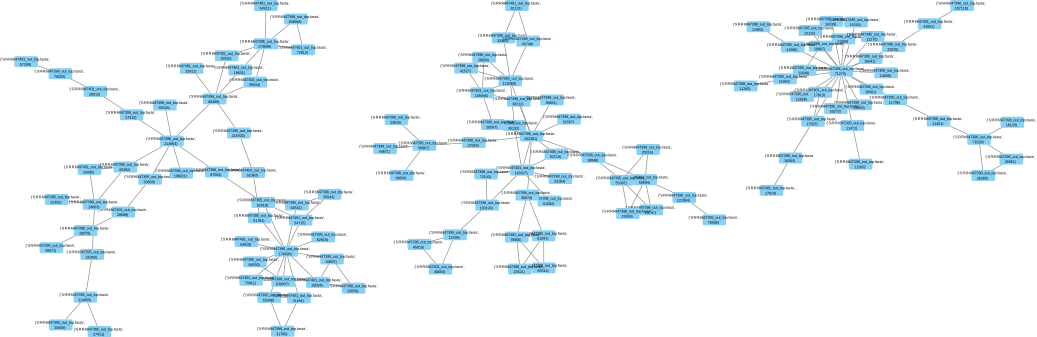
Export the entire gene matches graph to a Graphviz
("dot") file. In principle, this file could be used to draw the full gene
matches graph via one of the Graphviz layout programs (e.g., neato, circo,
etc.), but, in practice, gene matches graphs are often too large to draw with
Graphviz, even for small analyses involving only four samples.
The function is included in case plotting some subgraph might be useful. The Graphviz export may also be practical for analyses with only three samples, but this is untested.
Examples
Export the gene matches graph from an analysis at my_analysis to GraphML and
write the result to standard output.
Export a graph located at analysis1/graph.pkl to Cytoscape JSON at
export.json.
export_matrix
Export a computed dissimilarity matrix to another format. By default, the matrix
is exported to the standard output, but the matrix can be exported to a file
instead using the --export-out option.
Currently, this script supports exporting to the following formats:
Options
| Config option | Long name | Short name | Description | Argument count | Type | Choices | Default value | Default value (flag only) | Required |
|---|---|---|---|---|---|---|---|---|---|
--input-config |
-c |
File from which to load configuration settings. | \(1\) | pathlib.Path |
OUTPUT_DIR/config.yaml |
No | |||
--show-config |
Display the computed configuration or arguments. | \(\ge 0\) | list[str] |
original_args, args, or config |
['config'] |
No | |||
--show-config-format |
Format for displaying computed config or arguments. | \(1\) | str |
dict, yaml, or json |
Depends on --show-config |
No | |||
--help |
-h |
Display a help message and exit. | \(0\) | No | |||||
verbose |
--verbose |
-v |
Print more output than usual. | \(0\) | bool |
False |
True |
No | |
matrix |
--matrix |
-m |
Output distance matrix location. | \(1\) | pathlib.Path |
OUTPUT_DIR/distance_matrix.h5 |
Yes | ||
output_dir |
--output-dir |
-O |
RNA-clique analysis output root directory. | \(1\) | pathlib.Path |
No | |||
--export-out |
-x |
Path to which to export the matrix. | \(1\) | pathlib.Path |
No | ||||
--format |
-f |
Format for writing distance matrix. | \(1\) | str |
matrix, table, csv, hdf, or pickle |
Dynamic | No | ||
--header |
Include header in distance matrix written. | \(0\) | True |
No |
The --format option defaults to matrix when writing to standard output. When
--export-out is provided, export_matrix tries to determine the output format
from the output file's file extension. If the file extension is not recongized
by export_matrix, the format again defaults to matrix.
Input format
This script expects the distance matrix as input.
Matrix export formats
By default, the matrix is written to standard output. When --export-out is
provided, the matrix is written to a file at the given path instead.
Matrix
The matrix format produces a 2D space-separated array of floating-point
values. The orders of samples in the rows and columns are the same, but neither
rows nor columns are labeled in the matrix format. To get labels on the rows
and columns, use the table format instead.
Example
0.0 0.005388803504220092 0.0054305311443104045 0.005459213437854515 0.005512249049959638 0.005736910464039689 0.00747255775698311 0.007539593449521158 0.007182140678310776 0.007276675683252087 0.007248347134681538 0.007283538806219465 0.00762743569213341 0.00743863245673041 0.007230214862207701 0.0073832767780768254
0.005388803504220092 0.0 0.005444154410878668 0.005457044881951446 0.005509492270546363 0.005524904289722484 0.007358911632464738 0.00734145312059913 0.007178641884408139 0.007222263591986068 0.007299566949444612 0.007294928786675735 0.007656986703430995 0.0073262905661900446 0.007408281261711856 0.007638552765508823
0.0054305311443104045 0.005444154410878668 0.0 0.005693270624845291 0.005504512466459697 0.005623807465660282 0.007460847632579519 0.007338287207960742 0.007026428740023054 0.007345203662465187 0.007298558140709513 0.007255076165936527 0.007773889001222752 0.007491181297100733 0.007461249801562505 0.007582443616558755
0.005459213437854515 0.005457044881951446 0.005693270624845291 0.0 0.005382294872687209 0.005624631102239679 0.007461600494472286 0.0075545366408871035 0.00722308988794688 0.007302489419096259 0.007593104402212075 0.007312652480260233 0.007717985706596547 0.007298352807919292 0.007431485603066781 0.007506446547060221
0.005512249049959638 0.005509492270546363 0.005504512466459697 0.005382294872687209 0.0 0.005408467697660717 0.007469933549435503 0.00747932919860101 0.0071926795719216485 0.007245129665339076 0.007446632250291478 0.007292153397566585 0.0075851662624996236 0.007313530586610903 0.007327216346131236 0.007692388221551249
0.005736910464039689 0.005524904289722484 0.005623807465660282 0.005624631102239679 0.005408467697660717 0.0 0.007555198645292785 0.007452169760737729 0.007267972973651089 0.00728552657657327 0.007427030130130788 0.007357451543864015 0.007678875003598042 0.007341109656108671 0.007358340294100507 0.007776166721858891
0.00747255775698311 0.007358911632464738 0.007460847632579519 0.007461600494472286 0.007469933549435503 0.007555198645292785 0.0 0.005588505140222338 0.0072828077441650175 0.0072497139542041485 0.007404599487716344 0.007604547828924467 0.00788919346350089 0.007324928371612728 0.00723491884565872 0.007607016896798138
0.007539593449521158 0.00734145312059913 0.007338287207960742 0.0075545366408871035 0.00747932919860101 0.007452169760737729 0.005588505140222338 0.0 0.007301401193487594 0.007086699780622347 0.007402177949342384 0.007471282891062408 0.007883648522377027 0.007332780007601444 0.007302255769002343 0.007709591684544236
0.007182140678310776 0.007178641884408139 0.007026428740023054 0.00722308988794688 0.0071926795719216485 0.007267972973651089 0.0072828077441650175 0.007301401193487594 0.0 0.005540287068859703 0.0072693817846589395 0.007325561099070532 0.007543946579835303 0.007294093624627043 0.007345516049973433 0.007336003543873897
0.007276675683252087 0.007222263591986068 0.007345203662465187 0.007302489419096259 0.007245129665339076 0.00728552657657327 0.0072497139542041485 0.007086699780622347 0.005540287068859703 0.0 0.007391276328118516 0.007457925962836311 0.0077668702857649685 0.007315902653215641 0.007282014518250357 0.007465439374296728
0.007248347134681538 0.007299566949444612 0.007298558140709513 0.007593104402212075 0.007446632250291478 0.007427030130130788 0.007404599487716344 0.007402177949342384 0.0072693817846589395 0.007391276328118516 0.0 0.005707789174069651 0.006126693346289233 0.005851743283501044 0.005801252770533637 0.005964403443675155
0.007283538806219465 0.007294928786675735 0.007255076165936527 0.007312652480260233 0.007292153397566585 0.007357451543864015 0.007604547828924467 0.007471282891062408 0.007325561099070532 0.007457925962836311 0.005707789174069651 0.0 0.00588497358210044 0.005482496045834437 0.005388058635962769 0.005730100739785911
0.00762743569213341 0.007656986703430995 0.007773889001222752 0.007717985706596547 0.0075851662624996236 0.007678875003598042 0.00788919346350089 0.007883648522377027 0.007543946579835303 0.0077668702857649685 0.006126693346289233 0.00588497358210044 0.0 0.0058109335333090244 0.00607229411236707 0.005964136017753867
0.00743863245673041 0.0073262905661900446 0.007491181297100733 0.007298352807919292 0.007313530586610903 0.007341109656108671 0.007324928371612728 0.007332780007601444 0.007294093624627043 0.007315902653215641 0.005851743283501044 0.005482496045834437 0.0058109335333090244 0.0 0.005699313542929577 0.005701078777889641
0.007230214862207701 0.007408281261711856 0.007461249801562505 0.007431485603066781 0.007327216346131236 0.007358340294100507 0.00723491884565872 0.007302255769002343 0.007345516049973433 0.007282014518250357 0.005801252770533637 0.005388058635962769 0.00607229411236707 0.005699313542929577 0.0 0.005664813883747902
0.0073832767780768254 0.007638552765508823 0.007582443616558755 0.007506446547060221 0.007692388221551249 0.007776166721858891 0.007607016896798138 0.007709591684544236 0.007336003543873897 0.007465439374296728 0.005964403443675155 0.005730100739785911 0.005964136017753867 0.005701078777889641 0.005664813883747902 0.0
Table
The table format produces a 2D space-separated array of floating-point values
with labeled rows. The orders of samples in the rows and columns are the same,
so column labels are not necessary. To get labels on the columns as well,
provide the --header flag.
To omit labels altogether, use the matrix format instead.
Example
rnac_out/od1/SRR2321383_top.fasta 0.0 0.005388803504220092 0.0054305311443104045 0.005459213437854515 0.005512249049959638 0.005736910464039689 0.00747255775698311 0.007539593449521158 0.007182140678310776 0.007276675683252087 0.007248347134681538 0.007283538806219465 0.00762743569213341 0.00743863245673041 0.007230214862207701 0.0073832767780768254
rnac_out/od1/SRR2321384_top.fasta 0.005388803504220092 0.0 0.005444154410878668 0.005457044881951446 0.005509492270546363 0.005524904289722484 0.007358911632464738 0.00734145312059913 0.007178641884408139 0.007222263591986068 0.007299566949444612 0.007294928786675735 0.007656986703430995 0.0073262905661900446 0.007408281261711856 0.007638552765508823
rnac_out/od1/SRR2321385_top.fasta 0.0054305311443104045 0.005444154410878668 0.0 0.005693270624845291 0.005504512466459697 0.005623807465660282 0.007460847632579519 0.007338287207960742 0.007026428740023054 0.007345203662465187 0.007298558140709513 0.007255076165936527 0.007773889001222752 0.007491181297100733 0.007461249801562505 0.007582443616558755
rnac_out/od1/SRR2321386_top.fasta 0.005459213437854515 0.005457044881951446 0.005693270624845291 0.0 0.005382294872687209 0.005624631102239679 0.007461600494472286 0.0075545366408871035 0.00722308988794688 0.007302489419096259 0.007593104402212075 0.007312652480260233 0.007717985706596547 0.007298352807919292 0.007431485603066781 0.007506446547060221
rnac_out/od1/SRR2321387_top.fasta 0.005512249049959638 0.005509492270546363 0.005504512466459697 0.005382294872687209 0.0 0.005408467697660717 0.007469933549435503 0.00747932919860101 0.0071926795719216485 0.007245129665339076 0.007446632250291478 0.007292153397566585 0.0075851662624996236 0.007313530586610903 0.007327216346131236 0.007692388221551249
rnac_out/od1/SRR2321388_top.fasta 0.005736910464039689 0.005524904289722484 0.005623807465660282 0.005624631102239679 0.005408467697660717 0.0 0.007555198645292785 0.007452169760737729 0.007267972973651089 0.00728552657657327 0.007427030130130788 0.007357451543864015 0.007678875003598042 0.007341109656108671 0.007358340294100507 0.007776166721858891
rnac_out/od1/SRR7990321_top.fasta 0.00747255775698311 0.007358911632464738 0.007460847632579519 0.007461600494472286 0.007469933549435503 0.007555198645292785 0.0 0.005588505140222338 0.0072828077441650175 0.0072497139542041485 0.007404599487716344 0.007604547828924467 0.00788919346350089 0.007324928371612728 0.00723491884565872 0.007607016896798138
rnac_out/od1/SRR7990322_top.fasta 0.007539593449521158 0.00734145312059913 0.007338287207960742 0.0075545366408871035 0.00747932919860101 0.007452169760737729 0.005588505140222338 0.0 0.007301401193487594 0.007086699780622347 0.007402177949342384 0.007471282891062408 0.007883648522377027 0.007332780007601444 0.007302255769002343 0.007709591684544236
rnac_out/od1/SRR8003736_top.fasta 0.007182140678310776 0.007178641884408139 0.007026428740023054 0.00722308988794688 0.0071926795719216485 0.007267972973651089 0.0072828077441650175 0.007301401193487594 0.0 0.005540287068859703 0.0072693817846589395 0.007325561099070532 0.007543946579835303 0.007294093624627043 0.007345516049973433 0.007336003543873897
rnac_out/od1/SRR8003737_top.fasta 0.007276675683252087 0.007222263591986068 0.007345203662465187 0.007302489419096259 0.007245129665339076 0.00728552657657327 0.0072497139542041485 0.007086699780622347 0.005540287068859703 0.0 0.007391276328118516 0.007457925962836311 0.0077668702857649685 0.007315902653215641 0.007282014518250357 0.007465439374296728
rnac_out/od1/SRR8003753_top.fasta 0.007248347134681538 0.007299566949444612 0.007298558140709513 0.007593104402212075 0.007446632250291478 0.007427030130130788 0.007404599487716344 0.007402177949342384 0.0072693817846589395 0.007391276328118516 0.0 0.005707789174069651 0.006126693346289233 0.005851743283501044 0.005801252770533637 0.005964403443675155
rnac_out/od1/SRR8003754_top.fasta 0.007283538806219465 0.007294928786675735 0.007255076165936527 0.007312652480260233 0.007292153397566585 0.007357451543864015 0.007604547828924467 0.007471282891062408 0.007325561099070532 0.007457925962836311 0.005707789174069651 0.0 0.00588497358210044 0.005482496045834437 0.005388058635962769 0.005730100739785911
rnac_out/od1/SRR8003755_top.fasta 0.00762743569213341 0.007656986703430995 0.007773889001222752 0.007717985706596547 0.0075851662624996236 0.007678875003598042 0.00788919346350089 0.007883648522377027 0.007543946579835303 0.0077668702857649685 0.006126693346289233 0.00588497358210044 0.0 0.0058109335333090244 0.00607229411236707 0.005964136017753867
rnac_out/od1/SRR8003756_top.fasta 0.00743863245673041 0.0073262905661900446 0.007491181297100733 0.007298352807919292 0.007313530586610903 0.007341109656108671 0.007324928371612728 0.007332780007601444 0.007294093624627043 0.007315902653215641 0.005851743283501044 0.005482496045834437 0.0058109335333090244 0.0 0.005699313542929577 0.005701078777889641
rnac_out/od1/SRR8003761_top.fasta 0.007230214862207701 0.007408281261711856 0.007461249801562505 0.007431485603066781 0.007327216346131236 0.007358340294100507 0.00723491884565872 0.007302255769002343 0.007345516049973433 0.007282014518250357 0.005801252770533637 0.005388058635962769 0.00607229411236707 0.005699313542929577 0.0 0.005664813883747902
rnac_out/od1/SRR8003762_top.fasta 0.0073832767780768254 0.007638552765508823 0.007582443616558755 0.007506446547060221 0.007692388221551249 0.007776166721858891 0.007607016896798138 0.007709591684544236 0.007336003543873897 0.007465439374296728 0.005964403443675155 0.005730100739785911 0.005964136017753867 0.005701078777889641 0.005664813883747902 0.0
CSV
The csv format produces a 2D comma-separated array of floating-point values
with labeled rows. The orders of samples in the rows and columns are the same,
so column labels are not necessary. To get labels on the columns as well,
provide the --header flag.
Example
rnac_out/od1/SRR2321383_top.fasta,0.0,0.005388803504220092,0.0054305311443104045,0.005459213437854515,0.005512249049959638,0.005736910464039689,0.00747255775698311,0.007539593449521158,0.007182140678310776,0.007276675683252087,0.007248347134681538,0.007283538806219465,0.00762743569213341,0.00743863245673041,0.007230214862207701,0.0073832767780768254
rnac_out/od1/SRR2321384_top.fasta,0.005388803504220092,0.0,0.005444154410878668,0.005457044881951446,0.005509492270546363,0.005524904289722484,0.007358911632464738,0.00734145312059913,0.007178641884408139,0.007222263591986068,0.007299566949444612,0.007294928786675735,0.007656986703430995,0.0073262905661900446,0.007408281261711856,0.007638552765508823
rnac_out/od1/SRR2321385_top.fasta,0.0054305311443104045,0.005444154410878668,0.0,0.005693270624845291,0.005504512466459697,0.005623807465660282,0.007460847632579519,0.007338287207960742,0.007026428740023054,0.007345203662465187,0.007298558140709513,0.007255076165936527,0.007773889001222752,0.007491181297100733,0.007461249801562505,0.007582443616558755
rnac_out/od1/SRR2321386_top.fasta,0.005459213437854515,0.005457044881951446,0.005693270624845291,0.0,0.005382294872687209,0.005624631102239679,0.007461600494472286,0.0075545366408871035,0.00722308988794688,0.007302489419096259,0.007593104402212075,0.007312652480260233,0.007717985706596547,0.007298352807919292,0.007431485603066781,0.007506446547060221
rnac_out/od1/SRR2321387_top.fasta,0.005512249049959638,0.005509492270546363,0.005504512466459697,0.005382294872687209,0.0,0.005408467697660717,0.007469933549435503,0.00747932919860101,0.0071926795719216485,0.007245129665339076,0.007446632250291478,0.007292153397566585,0.0075851662624996236,0.007313530586610903,0.007327216346131236,0.007692388221551249
rnac_out/od1/SRR2321388_top.fasta,0.005736910464039689,0.005524904289722484,0.005623807465660282,0.005624631102239679,0.005408467697660717,0.0,0.007555198645292785,0.007452169760737729,0.007267972973651089,0.00728552657657327,0.007427030130130788,0.007357451543864015,0.007678875003598042,0.007341109656108671,0.007358340294100507,0.007776166721858891
rnac_out/od1/SRR7990321_top.fasta,0.00747255775698311,0.007358911632464738,0.007460847632579519,0.007461600494472286,0.007469933549435503,0.007555198645292785,0.0,0.005588505140222338,0.0072828077441650175,0.0072497139542041485,0.007404599487716344,0.007604547828924467,0.00788919346350089,0.007324928371612728,0.00723491884565872,0.007607016896798138
rnac_out/od1/SRR7990322_top.fasta,0.007539593449521158,0.00734145312059913,0.007338287207960742,0.0075545366408871035,0.00747932919860101,0.007452169760737729,0.005588505140222338,0.0,0.007301401193487594,0.007086699780622347,0.007402177949342384,0.007471282891062408,0.007883648522377027,0.007332780007601444,0.007302255769002343,0.007709591684544236
rnac_out/od1/SRR8003736_top.fasta,0.007182140678310776,0.007178641884408139,0.007026428740023054,0.00722308988794688,0.0071926795719216485,0.007267972973651089,0.0072828077441650175,0.007301401193487594,0.0,0.005540287068859703,0.0072693817846589395,0.007325561099070532,0.007543946579835303,0.007294093624627043,0.007345516049973433,0.007336003543873897
rnac_out/od1/SRR8003737_top.fasta,0.007276675683252087,0.007222263591986068,0.007345203662465187,0.007302489419096259,0.007245129665339076,0.00728552657657327,0.0072497139542041485,0.007086699780622347,0.005540287068859703,0.0,0.007391276328118516,0.007457925962836311,0.0077668702857649685,0.007315902653215641,0.007282014518250357,0.007465439374296728
rnac_out/od1/SRR8003753_top.fasta,0.007248347134681538,0.007299566949444612,0.007298558140709513,0.007593104402212075,0.007446632250291478,0.007427030130130788,0.007404599487716344,0.007402177949342384,0.0072693817846589395,0.007391276328118516,0.0,0.005707789174069651,0.006126693346289233,0.005851743283501044,0.005801252770533637,0.005964403443675155
rnac_out/od1/SRR8003754_top.fasta,0.007283538806219465,0.007294928786675735,0.007255076165936527,0.007312652480260233,0.007292153397566585,0.007357451543864015,0.007604547828924467,0.007471282891062408,0.007325561099070532,0.007457925962836311,0.005707789174069651,0.0,0.00588497358210044,0.005482496045834437,0.005388058635962769,0.005730100739785911
rnac_out/od1/SRR8003755_top.fasta,0.00762743569213341,0.007656986703430995,0.007773889001222752,0.007717985706596547,0.0075851662624996236,0.007678875003598042,0.00788919346350089,0.007883648522377027,0.007543946579835303,0.0077668702857649685,0.006126693346289233,0.00588497358210044,0.0,0.0058109335333090244,0.00607229411236707,0.005964136017753867
rnac_out/od1/SRR8003756_top.fasta,0.00743863245673041,0.0073262905661900446,0.007491181297100733,0.007298352807919292,0.007313530586610903,0.007341109656108671,0.007324928371612728,0.007332780007601444,0.007294093624627043,0.007315902653215641,0.005851743283501044,0.005482496045834437,0.0058109335333090244,0.0,0.005699313542929577,0.005701078777889641
rnac_out/od1/SRR8003761_top.fasta,0.007230214862207701,0.007408281261711856,0.007461249801562505,0.007431485603066781,0.007327216346131236,0.007358340294100507,0.00723491884565872,0.007302255769002343,0.007345516049973433,0.007282014518250357,0.005801252770533637,0.005388058635962769,0.00607229411236707,0.005699313542929577,0.0,0.005664813883747902
rnac_out/od1/SRR8003762_top.fasta,0.0073832767780768254,0.007638552765508823,0.007582443616558755,0.007506446547060221,0.007692388221551249,0.007776166721858891,0.007607016896798138,0.007709591684544236,0.007336003543873897,0.007465439374296728,0.005964403443675155,0.005730100739785911,0.005964136017753867,0.005701078777889641,0.005664813883747902,0.0
HDF
The hdf format produces a binary HDF5 store with a single key, matrix,
containing the matrix stored as an HDF5 group in the
fixed format
used by Pandas. This is the same format used by default for the input distance
matrix.
Pickle
The pickle format produces a binary serialized representation of the distance
matrix Pandas dataframe in the format used by Python's Pickle virtual machine.
Examples
Export the distance matrix for the analysis located at my_analysis to a
space-separated table with labels for both rows and columns, writing to standard
output.
Export the distance matrix located at analysis1/matrix.h5 to a Python pickle
file saved at matrix.pkl.
export_orthologs
Export ortholog sequences from ideal components for a single RNA-clique analysis.
This script exports the sequences of all isoforms belonging to genes found in ideal components. How to organize these sequences can be controlled via the command-line options.
If you wish to export orthologs for multiple analyses with typical settings or
would like to search exported orthologs using typical settings, you may prefer
to use export_and_search.
Options
| Config option | Long name | Short name | Description | Argument count | Type | Choices | Default value | Default value (flag only) | Required |
|---|---|---|---|---|---|---|---|---|---|
--input-config |
-c |
File from which to load configuration settings. | \(1\) | pathlib.Path |
OUTPUT_DIR/config.yaml |
No | |||
--show-config |
Display the computed configuration or arguments. | \(\ge 0\) | list[str] |
original_args, args, or config |
['config'] |
No | |||
--show-config-format |
Format for displaying computed config or arguments. | \(1\) | str |
dict, yaml, or json |
Depends on --show-config |
No | |||
--help |
-h |
Display a help message and exit. | \(0\) | No | |||||
verbose |
--verbose |
-v |
Print more output than usual. | \(0\) | bool |
False |
True |
No | |
graph |
--graph |
-g |
Gene matches graph. | \(1\) | pathlib.Path |
OUTPUT_DIR/graph.pkl |
Yes | ||
tables_dir |
--tables-dir |
-O2 |
Directory containing gene matches tables. | \(1\) | pathlib.Path |
OUTPUT_DIR/od2 |
Yes | ||
jobs |
--jobs |
-j |
Number of parallel jobs to use. | \(1\) | int |
THREADS - 1 |
Yes | ||
transcript_id_regex |
--transcript-id-regex |
-p |
Python regex to use for parsing transcript IDs. | \(1\) | re.Pattern |
^.*cov_([0-9]+(?:\.[0-9]+))_g([0-9]+)_i([0-9]+) |
Yes | ||
output_dir |
--output-dir |
-A |
RNA-clique analysis root (output_dir). | \(1\) | pathlib.Path |
No | |||
--export-output-dir |
-X |
Output directory in which to store exported orthologs. | \(1\) | pathlib.Path |
Yes | ||||
--by |
-b |
Attribute by which to organize orthologs in export. | \(1\) | str |
sample or component |
sample |
No | ||
--remove-non-contributing |
-N |
Remove ideal components that contribute no differences. | \(0\) | True |
No | ||||
--debug |
Enable debug behavior. | \(0\) | True |
No | |||||
--concat-id-order |
-o |
Where to place original sequence ID relative to group name. | \(1\) | str |
before or after |
after |
No | ||
--no-fix-strand |
Do not attempt to put transcripts in consistent orientations. | \(0\) | True |
No | |||||
--allow-inconsistent |
-i |
Approximate transcript reorientation instead of failing. | \(0\) | True |
No | ||||
--all |
-a |
Create combined all_ideal.fasta file. | \(0\) | True |
No |
by
The --by option changes the way in which the output orthologs are organized
into files. The are currently two ways to organize the output orthologs—by
sample or by component.
sample
If orthologs are exported by sample, then each output file contains all
transcript isoforms of all genes in ideal components for a single sample. For
each exported transcript, the ideal component to which each transcript's gene
belongs is added to the transcript's FASTA sequence header, allowing
identification of corresponding orthologs across multiple samples. Transcripts
are sorted by their ideal component IDs in every file, facilitating comparison
across multiple samples.
>-NODE_11_length_11173_cov_10.655520_g5_i0:ideal_component_0
GTCGGAACCGAGCACTGCTAGACGAGTTGGAGTGGCACCAGACATTGCAAGGAATCTGCA
...
>NODE_12_length_11173_cov_10.643563_g5_i1:ideal_component_0
CGGAACCGAGCACTGCTAGACGAGTTGGAGGCACCAGACTTTGCAACAAATCTGCACTAA
...
>NODE_1_length_15341_cov_25.030735_g0_i0:ideal_component_1
CGGAGACCCACAGACTCGTACTGAAGACCAAACGAACACCATCCGTAGGGGTTCAAAATG
...
component
If orthologs are exported by component, then each output file contains all
transcript isoforms of all genes in a single ideal component. For each exported
transcript, the sample to which the transcript belongs is added to the
transcript's FASTA sequence header.
>-NODE_1_length_15383_cov_32.255511_g0_i0:SRR2321385
CGGAGCCCGCTGGAGCCGGCGCCGTCCTCGCTGCGGCCCGCGCGGTCGTCTCCACCGTCC
...
>NODE_3959_length_2941_cov_7.131397_g0_i1:SRR2321385
CGGAGCCCGCTGGAGCCGGCGCCGTCCTCGCTGCGGCCCGCGCGGTCGTCTCCACCGTCC
...
>-NODE_5_length_12142_cov_36.058215_g2_i0:SRR2321386
TTGAAGTGCCTGTTACGTGGATTTCCATCAGAGTACACTTCTAGCAACAATACTCTTCTT
...
Input format
The inputs to this script are the gene matches tables and gene matches graph.
Output format
Directory structure
export_orthologs organizes the output transcripts into multiple files; how the
output files are organized is specified using the --by parameter. Optionally,
when --all is specified, this script will also produce an all_ideal.fasta
file containing all of the output transcripts from the other files. Such a file
is useful for searching with BLAST. The all_ideal.fasta file should contain
all of the exported transcripts from ideal components. It differs from the file
that would be produced by simply concatenating all of the other exported FASTA
files in that the all_ideal.fasta file appends identifiers to each
transcript's FASTA sequence header indicating in which file the sequence was
originally found. For example, where an individual ideal component file
ideal_component_0.fasta would have a sequence with FASTA header
NODE_1_length_15383_cov_32.255511_g0_i0:SRR2321385, the same sequence would
have the FASTA header
NODE_1_length_15383_cov_32.255511_g0_i0:SRR2321385:ideal_component_0 in the
all_ideal.fasta file.
When outputs are organized by component, the files are combined in increasing
order of ideal component ID. When outputs are organized by sample, the files
are combined in the order their corresponding samples appear in the rows or
columns of the distance matrix.
File format
Transcripts are exported in FASTA
format and are sourced
from the input top genes. Exported transcripts retain the text in their original
FASTA sequence headers, but the exporter also adds some extra information. What
specific information is added depends on how the output is organized via the
--by parameter. The added information is separated from the original
FASTA header by a colon (:); whether the added information comes first or
second can be controlled by the --concat-id-order parameter.
Additionally, if the exporter has placed all transcripts for each ideal
component in the same orientation, transcripts for which the orientation has
been altered relative to the input are prefixed with -. If the orientation of
the output transcript is the same as it was in the input, no prefix is added.
Examples
Export orthologs from ideal components identified in the analysis located at
my_analysis to a directory called export. Organize the results by component.
Export orthologs from ideal components identified in the analysis located at
my_analysis to a directory called export2. Organize the results by sample.
Ignore ideal components where there are no differences in the aligned regions of
the transcripts, and create a combined all_ideal.fasta file containing all of
the other exported transcripts.
filtered_distance
Compute pairwise distances from gene matches tables and graph.
Options
| Config option | Long name | Short name | Description | Argument count | Type | Choices | Default value | Default value (flag only) | Required |
|---|---|---|---|---|---|---|---|---|---|
--input-config |
-c |
File from which to load configuration settings. | \(1\) | pathlib.Path |
OUTPUT_DIR/config.yaml |
No | |||
--show-config |
Display the computed configuration or arguments. | \(\ge 0\) | list[str] |
original_args, args, or config |
['config'] |
No | |||
--show-config-format |
Format for displaying computed config or arguments. | \(1\) | str |
dict, yaml, or json |
Depends on --show-config |
No | |||
--help |
-h |
Display a help message and exit. | \(0\) | No | |||||
verbose |
--verbose |
-v |
Print more output than usual. | \(0\) | bool |
False |
True |
No | |
graph |
--graph |
-g |
Gene matches graph. | \(1\) | pathlib.Path |
OUTPUT_DIR/graph.pkl |
Yes | ||
tables_dir |
--tables-dir |
-O2 |
Directory containing gene matches tables. | \(1\) | pathlib.Path |
OUTPUT_DIR/od2 |
Yes | ||
matrix |
--matrix |
-m |
Output distance matrix location. | \(1\) | pathlib.Path |
OUTPUT_DIR/distance_matrix.h5 |
Yes | ||
output_dir |
--output-dir |
-O |
RNA-clique analysis output root directory. | \(1\) | pathlib.Path |
No | |||
--output-config |
-c2 |
File in which to store computed config after analysis. | \(1\) | pathlib.Path |
OUTPUT_DIR/config.yaml |
No |
Input format
The inputs to this script are the gene matches graph and gene matches tables.
Output format
The output of this script is the distance matrix.
Example
Compute a distance matrix using the gene matches graph and gene matches tables
found under rna_clique_out/graph.pkl and rna_clique_out/od2, respectively.
Write the matrix to rna_clique_out/distance_matrix.h5.
Compute a distance matrix using the gene matches graph at graph.pkl and the
gene matches tables under tables_dir. Write the matrix to matrix.h5.
filtering_step
This script automates "phase 1" of RNA-clique in which the following steps occur:
- The top \(n\) genes for each sample are selected by \(k\)-mer coverage.
- The gene matches tables are found by executing a BLAST search for each pair of samples in both directions. (That is, for samples \(a\) and \(b\), we BLAST both \(a\) vs. \(b\) and \(b\) vs. \(a\).)
- The gene matches graph is constructed from the gene matches tables.
Positional arguments
| Position | Config option | Description | Argument count | Type |
|---|---|---|---|---|
| 0 | input_dirs |
Directories containing the transcript FASTA files. | \(\ge 0\) | list[pathlib.Path] |
Options
| Config option | Long name | Short name | Description | Argument count | Type | Choices | Default value | Default value (flag only) | Required |
|---|---|---|---|---|---|---|---|---|---|
--input-config |
-c |
File from which to load configuration settings. | \(1\) | pathlib.Path |
OUTPUT_DIR/config.yaml |
No | |||
--show-config |
Display the computed configuration or arguments. | \(\ge 0\) | list[str] |
original_args, args, or config |
['config'] |
No | |||
--show-config-format |
Format for displaying computed config or arguments. | \(1\) | str |
dict, yaml, or json |
Depends on --show-config |
No | |||
--help |
-h |
Display a help message and exit. | \(0\) | No | |||||
verbose |
--verbose |
-v |
Print more output than usual. | \(0\) | bool |
False |
True |
No | |
top_genes |
--top-genes |
-n |
Number of top genes by k-mer coverate to select. | \(1\) | int |
Yes | |||
top_matches |
--top-matches |
-N |
Threshold for counting a match between two genes. | \(1\) | int |
\(1\) | Yes | ||
transcripts_name |
--transcripts-name |
-t |
Name of transcripts files in input directories. | \(1\) | str |
transcripts.fasta |
Yes | ||
top_genes_dir |
--top-genes-dir |
-O1 |
Directory containing top n genes by coverage. | \(1\) | pathlib.Path |
OUTPUT_DIR/od1 |
Yes | ||
tables_dir |
--tables-dir |
-O2 |
Directory containing gene matches tables. | \(1\) | pathlib.Path |
OUTPUT_DIR/od2 |
Yes | ||
transcript_id_regex |
--transcript-id-regex |
-p |
Python regex to use for parsing transcript IDs. | \(1\) | re.Pattern |
^.*cov_([0-9]+(?:\.[0-9]+))_g([0-9]+)_i([0-9]+) |
Yes | ||
evalue |
--evalue |
-e |
e-value threshold to use for BLASTn searches. | \(1\) | float |
\(1 \times 10^{-99}\) | Yes | ||
jobs |
--jobs |
-j |
Number of parallel jobs to use. | \(1\) | int |
THREADS - 1 |
Yes | ||
cache_dir |
--cache-dir |
-C |
Directory containing BLAST DB caches. | \(1\) | pathlib.Path |
OUTPUT_DIR/db_cache |
Yes | ||
graph |
--graph |
-g |
Gene matches graph. | \(1\) | pathlib.Path |
OUTPUT_DIR/graph.pkl |
Yes | ||
output_dir |
--output-dir |
-O |
RNA-clique analysis output root directory. | \(1\) | pathlib.Path |
No | |||
title |
--title |
-T |
Name to assign to the analysis. | \(1\) | str |
OUTPUT_DIR.name |
No | ||
keep_all |
--no-keep-all |
Do not keep all matches in case of a tie. | \(0\) | bool |
True |
False |
No | ||
--output-config |
-c2 |
File in which to store computed config after analysis. | \(1\) | pathlib.Path |
OUTPUT_DIR/config.yaml |
No |
Input format
The inputs to this script are the transcriptomes.
Output format
The outputs of this script are the top genes, gene matches tables, and the gene matches graph.
Examples
Complete phase 1 of RNA-clique for input files located under input1, input2,
and input3. Input transcriptomes are assumed to be named transcripts.fasta,
so the actual input transcriptomes are located at input1/transcripts.fasta,
inputs2/transcripts.fasta, and input3/transcripts.fasta. The samples' names
are assumed to be the directory names, input1, input2, and input3. Write
the top genes, gene matches tables, and graph under the my_analysis directory.
Top genes will be under my_analysis/od1; the top genes for input1, input2,
and input3 will be located at my_analysis/od1/input1_top.fasta,
my_analysis/od2/input2_top.fasta, and my_analysis/od1/input3_top.fasta,
respectively.
Gene matches tables for each pair of samples will be under my_analysis/od2.
The files will be my_analysis/od2/input1--input2.h5,
my_analysis_od2/input1--input3.h5, and my_analysis/od2/input2--input3.h5,
representing the comparisons between input1 and input2, input1 and
input3, and input2 and input3, respectively.
The gene matches graph will be at my_analysis/graph.pkl.
Run phase 1 of RNA-clique for input files located at sample1, sample2, and
sample3. Input transcriptomes are located at data.fasta, so the actual input
transcriptomes are sample1/data.fasta, sample2/data.fasta, and
sample3/data.fasta. In the case of ties when selecting pairs of genes with
maximum bitscore for the gene matches tables, don't keep all pairs; instead,
split the ties arbitrarily. Use \(10^{-50}\) for the e-value cutoff. Write the top
genes under my_top_genes. Run with 10 parallel jobs. Write the gene matches
tables under my_gene_matches_tables, and write the graph to
my_gene_matches_graph.pkl. Write the intermediate BLAST DB cache to
db_caches.
Top genes will be under my_top_genes. The top genes for sample1, sample2,
and sample3 will be located at my_top_genes/sample1_top.fasta,
my_top_genes/sample2_top.fasta, and my_top_genes/sample3_top.fasta,
respectively.
Gene matches tables for each pair of samples will be under
my_gene_matches_tables. The files will be
my_gene_matches_tables/sample1--sample2.h5,
my_gene_matches_tables/sample1--sample3.h5,
my_gene_matches_tables/sample2--sample3.h5, representing the gene matches
tables for sample1 and sample2, sample1 and sample3, and sample2 and
sample3, respectively.
The gene matches graph will be at my_gene_matches_graph.pkl.
python -m rna_clique.filtering_step -O1 my_top_genes \
                                    -O2 my_gene_matches_tables \
                                    -g my_gene_matches_graph.pkl \
                                    --no-keep-all \
                                    -e 10e-50 \
                                    -j 10 \
                                    -C db_caches \
                                    sample1 sample2 sample3
find_all_pairs
This script calculates the gene matches tables for all pairs of samples by BLASTing each sample against every other.
Options
| Config option | Long name | Short name | Description | Argument count | Type | Choices | Default value | Default value (flag only) | Required |
|---|---|---|---|---|---|---|---|---|---|
--input-config |
-c |
File from which to load configuration settings. | \(1\) | pathlib.Path |
OUTPUT_DIR/config.yaml |
No | |||
--show-config |
Display the computed configuration or arguments. | \(\ge 0\) | list[str] |
original_args, args, or config |
['config'] |
No | |||
--show-config-format |
Format for displaying computed config or arguments. | \(1\) | str |
dict, yaml, or json |
Depends on --show-config |
No | |||
--help |
-h |
Display a help message and exit. | \(0\) | No | |||||
verbose |
--verbose |
-v |
Print more output than usual. | \(0\) | bool |
False |
True |
No | |
top_genes_dir |
--top-genes-dir |
-O1 |
Directory containing top n genes by coverage. | \(1\) | pathlib.Path |
OUTPUT_DIR/od1 |
Yes | ||
transcript_id_regex |
--transcript-id-regex |
-p |
Python regex to use for parsing transcript IDs. | \(1\) | re.Pattern |
^.*cov_([0-9]+(?:\.[0-9]+))_g([0-9]+)_i([0-9]+) |
Yes | ||
tables_dir |
--tables-dir |
-O2 |
Directory containing gene matches tables. | \(1\) | pathlib.Path |
OUTPUT_DIR/od2 |
Yes | ||
cache_dir |
--cache-dir |
-C |
Directory containing BLAST DB caches. | \(1\) | pathlib.Path |
OUTPUT_DIR/db_cache |
Yes | ||
evalue |
--evalue |
-e |
e-value threshold to use for BLASTn searches. | \(1\) | float |
\(1 \times 10^{-99}\) | No | ||
title |
--title |
-T |
Name to assign to the analysis. | \(1\) | str |
OUTPUT_DIR.name |
No | ||
output_dir |
--output-dir |
-O |
RNA-clique analysis output root directory. | \(1\) | pathlib.Path |
No | |||
jobs |
--jobs |
-j |
Number of parallel jobs to use. | \(1\) | int |
THREADS - 1 |
No | ||
--sample-regex |
-R |
Python regex for parsing sample names | \(1\) | re.<function compile at 0x7d7b6d2e3ec0> |
re.compile('^(.*?)_.*$') |
No | |||
--output-config |
-c2 |
File in which to store computed config after analysis. | \(1\) | pathlib.Path |
OUTPUT_DIR/config.yaml |
No |
Input format
The inputs for this script are the top genes.
Output format
The outputs for this script are the gene matches tables.
Examples
Get gene matches tables for an RNA-clique analysis located at my_analysis. Top
\(n\) genes by \(k\)-mer coverage are expected to be in my_analysis/od1. Gene
matches tables will be written under my_analysis/od2
Get gene matches tables from top \(n\) genes located under my_top_genes_dir and
write the gene matches tables under my_gene_matches_tables. Use an \(e\)-value
cutoff of \(10^{-50}\). Write intermediate BLAST DB caches under db_caches.
python -m rna_clique.find_all_pairs -O1 my_top_genes_dir \
                                    -O2 my_gene_matches_tables \
                                    -C db_caches \
                                    -e 1e-50
find_homologs
This script computes a genetic similarity for a single pair of samples. By default, it also reports best matching pairs of genes between the two samples.
Warning: This script should not be used if you are analyzing more than two
samples total! Use rna-clique instead!
Positional arguments
| Position | Description | Argument count | Type |
|---|---|---|---|
| 0 | path to the (top n) transcripts for the first sample | \(1\) | pathlib.Path |
| 1 | path to the (top n) transcripts for the second sample | \(1\) | pathlib.Path |
Options
| Config option | Long name | Short name | Description | Argument count | Type | Choices | Default value | Default value (flag only) | Required |
|---|---|---|---|---|---|---|---|---|---|
--input-config |
-c |
File from which to load configuration settings. | \(1\) | pathlib.Path |
OUTPUT_DIR/config.yaml |
No | |||
--show-config |
Display the computed configuration or arguments. | \(\ge 0\) | list[str] |
original_args, args, or config |
['config'] |
No | |||
--show-config-format |
Format for displaying computed config or arguments. | \(1\) | str |
dict, yaml, or json |
Depends on --show-config |
No | |||
--help |
-h |
Display a help message and exit. | \(0\) | No | |||||
verbose |
--verbose |
-v |
Print more output than usual. | \(0\) | bool |
False |
True |
No | |
transcript_id_regex |
--transcript-id-regex |
-p |
Python regex to use for parsing transcript IDs. | \(1\) | re.Pattern |
^.*cov_([0-9]+(?:\.[0-9]+))_g([0-9]+)_i([0-9]+) |
Yes | ||
evalue |
--evalue |
-e |
e-value threshold to use for BLASTn searches. | \(1\) | float |
\(1 \times 10^{-99}\) | Yes | ||
top_matches |
--top-matches |
-N |
Threshold for counting a match between two genes. | \(1\) | int |
\(1\) | Yes | ||
keep_all |
--keep-all |
Keep all matches between genes in the case of ties. | \(0\) | bool |
True |
True |
Yes | ||
--quiet |
-q |
hide the matches found | \(0\) | True |
No | ||||
--report-float |
-f |
report float instead of fraction | \(0\) | True |
No |
Input format
The inputs to this script should be the top genes FASTA files for exactly two samples.
Output format
Unless --quiet/-q has been specified, the output begins with a list of pairs
of gene IDs of likely homologous gene pairs between the two input gene sets. The
list of homologous gene pairs is followed by the unfiltered similarity between
the two samples.
By default, the similarity is reported as an irreducible fraction to provide
maximum precision. To report the similarity as a floating-point decimal number
instead, provide the --report-float/-f option to this script.
Example
For brevity, not all pairs of homologous genes are shown in this example.
7223 9664
11196 11799
13208 10969
13305 32659
22491 21604
41294 51241
44115 56286
45706 74954
55553 67245
66369 49022
30993737/31217075
Examples
Find an unfiltered genetic distance between the transcripts in
transcripts1.fasta and transcripts2.fasta. Show which pairs of genes in the
two files appear to best match.
Find an unfiltered genetic distance between the transcripts in
transcripts1.fasta and transcripts2.fasta. Report the distance only, as a
floating point number.
make_subset
This script creates links to gene matches tables and a gene matches graph for a
subset of samples from a previously completed run of phase 1 of RNA-clique.
make_subset is useful when you want to compute distances for a subset of
samples that you've already analyzed with RNA-clique. This script is typically
much faster than re-running Phase 1 on a subset of the input FASTA files since
this script does not need to repeat any of the BLAST searches from the prior
analysis.
Options
| Config option | Long name | Short name | Description | Argument count | Type | Choices | Default value | Default value (flag only) | Required |
|---|---|---|---|---|---|---|---|---|---|
--input-config |
-c |
File from which to load configuration settings. | \(1\) | pathlib.Path |
OUTPUT_DIR/config.yaml |
No | |||
--show-config |
Display the computed configuration or arguments. | \(\ge 0\) | list[str] |
original_args, args, or config |
['config'] |
No | |||
--show-config-format |
Format for displaying computed config or arguments. | \(1\) | str |
dict, yaml, or json |
Depends on --show-config |
No | |||
--help |
-h |
Display a help message and exit. | \(0\) | No | |||||
verbose |
--verbose |
-v |
Print more output than usual. | \(0\) | bool |
False |
True |
No | |
tables_dir |
--tables-dir |
-O2 |
Directory containing gene matches tables. | \(1\) | pathlib.Path |
OUTPUT_DIR/od2 |
Yes | ||
graph |
--graph |
-g |
Gene matches graph. | \(1\) | pathlib.Path |
OUTPUT_DIR/graph.pkl |
Yes | ||
output_dir |
--output-dir |
-O |
RNA-clique analysis output root directory. | \(1\) | pathlib.Path |
No | |||
title |
--title |
-T |
Name to assign to the analysis. | \(1\) | str |
OUTPUT_DIR.name |
No | ||
subset_of |
--subset-of |
-I |
Path to analysis of which this is a subset. | \(1\) | pathlib.Path |
Yes | |||
--exclude |
-x |
samples to exclude (default is none) | \(\ge 1\) | list[str] |
[] |
No | |||
--include |
-y |
samples to include (default is all) | \(\ge 1\) | list[str] |
[] |
No | |||
--include-regex |
-Y |
regular expression specifying which sample names to include | \(1\) | re.<function compile at 0x7d7b6d2e3ec0> |
No | ||||
--output-config |
-c2 |
File in which to store computed config after analysis. | \(1\) | pathlib.Path |
OUTPUT_DIR/config.yaml |
No | |||
--include-file |
file containing samples to include | \(1\) | pathlib.Path |
No | |||||
--exclude-file |
file containing samples to exclude | \(1\) | pathlib.Path |
No | |||||
--show-included |
show which samples would be included and exit | \(0\) | True |
No |
Output format
The symbolic links to the gene matches tables
belonging to the subset are placed under the specified tables_dir, or an od2
subdirectory of the specified root output directory. The new gene matches
graph is saved at the specified graph path, or
in a file named graph.pkl directly under the root output directory.
Examples
Create an analysis for a subset of samples from the analysis described by
my_analysis/config.yaml. Exclude samples named sample2 and sample4. Create
the tables directory containing symlinks and the gene matches graph under
my_subset.
Create an analysis for a subset of samples from the analysis described by
my_analysis/config.yaml. Include only samples matching the regular expression
sample.*2. Create the samples directory containing symlinks at subset_tables
and create the gene matches graph at subset_graph.pkl
python -m rna_clique.make_subset -I my_analysis/config.yaml \
                                 -O2 subset_tables \
                                 -g subset_graph.pkl
                                 -Y 'sample.*2'
plot_component_sizes
Despite its name, plot_component_sizes offers a variety of features useful for
working with gene matches graphs:
- Visualizations
- Statistics
- Ideal components
- Large components
- Total components
Options
| Config option | Long name | Short name | Description | Argument count | Type | Choices | Default value | Default value (flag only) | Required |
|---|---|---|---|---|---|---|---|---|---|
--input-config |
-c |
File from which to load configuration settings. | \(1\) | pathlib.Path |
OUTPUT_DIR/config.yaml |
No | |||
--show-config |
Display the computed configuration or arguments. | \(\ge 0\) | list[str] |
original_args, args, or config |
['config'] |
No | |||
--show-config-format |
Format for displaying computed config or arguments. | \(1\) | str |
dict, yaml, or json |
Depends on --show-config |
No | |||
--help |
-h |
Display a help message and exit. | \(0\) | No | |||||
verbose |
--verbose |
-v |
Print more output than usual. | \(0\) | bool |
False |
True |
No | |
graph |
--graph |
-g |
Gene matches graph. | \(1\) | pathlib.Path |
OUTPUT_DIR/graph.pkl |
Yes | ||
tables_dir |
--tables-dir |
-O2 |
Directory containing gene matches tables. | \(1\) | pathlib.Path |
OUTPUT_DIR/od2 |
No | ||
output_dir |
--output-dir |
-A |
RNA-clique analysis output root directory. | \(1\) | pathlib.Path |
No | |||
--size-plot |
-s |
output path for component size histogram | \(1\) | pathlib.Path |
No | ||||
--sample-plot |
-S |
output path for represented sample count plot | \(1\) | pathlib.Path |
No | ||||
--ratio-plot |
-r |
output path for KDE of represented sample count / component size | \(1\) | pathlib.Path |
No | ||||
--density-plot |
-d |
output path for KDE of component density | \(1\) | pathlib.Path |
No | ||||
--statistics |
print statistics in the desired format (human or machine-readable) | \(0--1\) | str |
h or m |
h |
No |
Visualizations
plot_component_sizes can produce several different plots related to components
of the gene matches graph.
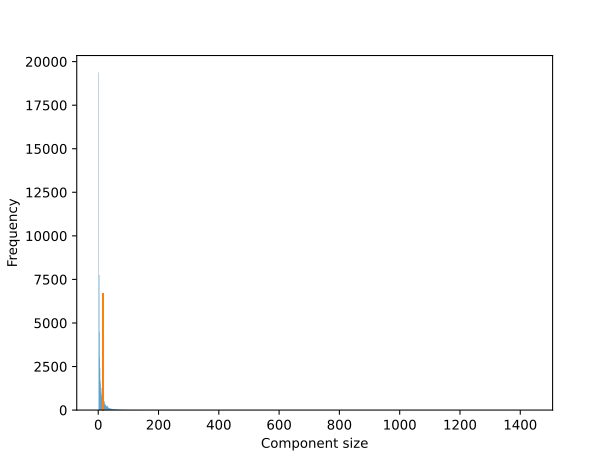
Component size histogram
This plot shows the distribution of sizes among connected components of the gene matches graph.
For most sizes, the bar in the histogram is drawn in blue. For the case where the size is exactly the number of samples, the bar is drawn in orange. Since a gene must match some other gene to be included in the gene matches graph, no bar is shown for the case where the size is 1.
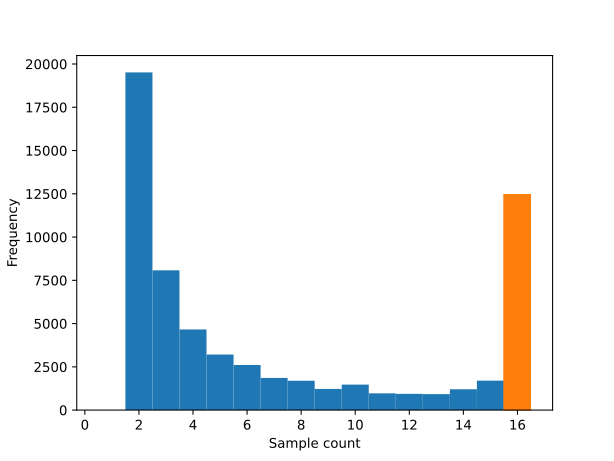
Represented sample count histogram
The number of samples represented in a connected component is the number of distinct samples to which genes in the component belong. For a given component, the number of represented samples is necessarily between 1 and the number of samples in the analysis.
This plot shows the distribution of number of represented samples among connected components in the gene matches graph.
For represented sample counts less than the number of samples , the bar in the histogram is drawn in blue. For the case where the represented sample count is exactly the number of samples, the bar is drawn in orange. Since a gene must match some other gene in another sample to be included in the gene matches graph, no bar is shown for the case where the represented sample count is 1.
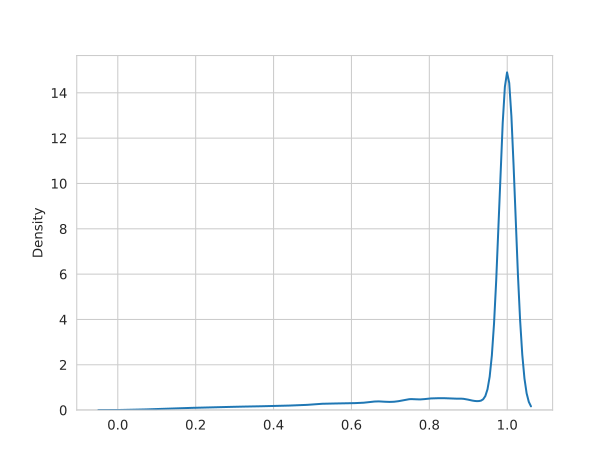
Sample count to component size ratio KDE plot
This plot shows the distribution of represented samples divided by component size for the components in the gene matches graph. Since this ratio can take on many fractional values, kernel density estimation is used to plot the distribution.
Component density KDE plot
This plot shows the distribution of component density for the gene matches graph, where density is computed as the number of edges that exist in the component divided by the number of edges that would exist if the component were complete. Since the density can take on many fractional values, kernel density estimation is used to plot the distribution.
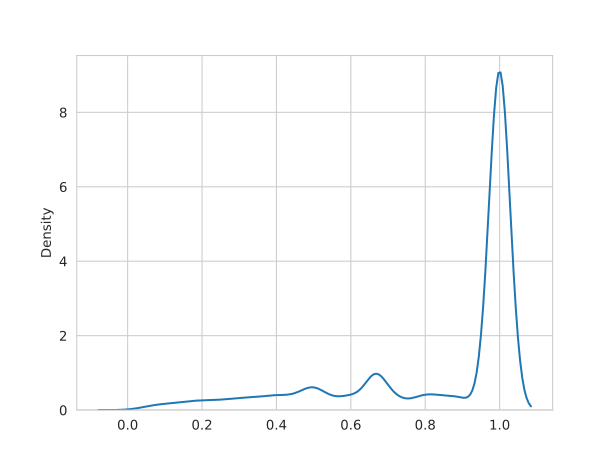
Output format
Figures can be saved in any format supported by the installed matplotlib's
savefig
function, which determines the format of the figure automatically from the file
extension.
When statistics are enabled, the statistics printed are, in order,
- Number of samples
- Count of total connected components
- Count of large components (those with at least as many vertices as there are samples)
- Count of ideal components
In the "human-readable" format, these values are labeled and are separated by newlines. In the "machine-readable" format, these values are unlabeled and are separated by spaces.
Examples
Create plots of component size frequency, represented sample count frequency,
ratio of sample count to component size frequency, and component density
frequency at size.svg, sample_count.svg, ratio.svg, and density.svg,
respectively, for the analysis rooted at my_analysis. Report statistics in
human-readable format.
python -m rna_clique.plot_component_sizes -O my_analysis \
                                          -s size.svg \
                                          -S sample_cout.svg \
                                          -r ratio.svg \
                                          -d density.svg \
                                          --statistics
Create a density KDE plot at density.png for the gene matches graph at
graph.pkl and top genes directory top_genes. Report statistics in a
machine-readable format.
python -m rna_clique.plot_component_sizes -O1 top_genes \
                                          -g graph.pkl \
                                          -d density.png \
                                          --statistics m
search_ideal_components
BLAST search the nucleotide sequences of orthologous transcripts belonging to genes in ideal components.
This script can be used, for example, to determine whether some possible contaminant could be contributing to distances observed.
This script is designed to be used on output from export_orthologs, but it
does more than simply perform a BLAST search on the exported ortholog sequences.
This script can perform an "extended" search (--extended-search/-e), which
automatically searches other isoforms of the same gene with relaxed parameters
when a query sequences matches one isoform of a gene. The extended search is
designed to find alignments between query sequences and other gene isoforms that
might be missed by a single BLAST search. The extended search does not
necessarily search all isoforms of a given gene; only those that are connected
to the originally matches isoform(s) in the orientation graph are searched.
When a BLAST hit for a query sequence is found in one of the exported ortholog
sequences, this script can also optionally export the ideal component to which
the transcript belongs. To enable this behavior, provide the
--export-components/-x command-line option.
If you would like to both export orthologs and search their sequences at once
with typical settings, you may prefer to use
export_and_search instead.
Options
| Config option | Long name | Short name | Description | Argument count | Type | Choices | Default value | Default value (flag only) | Required |
|---|---|---|---|---|---|---|---|---|---|
--input-config |
-c |
File from which to load configuration settings. | \(1\) | pathlib.Path |
OUTPUT_DIR/config.yaml |
No | |||
--show-config |
Display the computed configuration or arguments. | \(\ge 0\) | list[str] |
original_args, args, or config |
['config'] |
No | |||
--show-config-format |
Format for displaying computed config or arguments. | \(1\) | str |
dict, yaml, or json |
Depends on --show-config |
No | |||
--help |
-h |
Display a help message and exit. | \(0\) | No | |||||
verbose |
--verbose |
-v |
Print more output than usual. | \(0\) | bool |
False |
True |
No | |
graph |
--graph |
-g |
Gene matches graph. | \(1\) | pathlib.Path |
OUTPUT_DIR/graph.pkl |
Yes | ||
tables_dir |
--tables-dir |
-O2 |
Directory containing gene matches tables. | \(1\) | pathlib.Path |
OUTPUT_DIR/od2 |
Yes | ||
jobs |
--jobs |
-j |
Number of parallel jobs to use. | \(1\) | int |
THREADS - 1 |
Yes | ||
transcript_id_regex |
--transcript-id-regex |
-p |
Python regex to use for parsing transcript IDs. | \(1\) | re.Pattern |
^.*cov_([0-9]+(?:\.[0-9]+))_g([0-9]+)_i([0-9]+) |
Yes | ||
output_dir |
--output-dir |
-A |
RNA-clique analysis root (output_dir). | \(1\) | pathlib.Path |
No | |||
--export-output-dir |
-X |
Directory containing exported orthologs to search. | \(1\) | pathlib.Path |
No | ||||
--all-ideal |
-a |
FASTA file containing all sequences from ideal components. | \(1\) | pathlib.Path |
Depends on export_output_dir |
Yes | |||
--ortholog-db-cache |
-D |
Directory in which to store BLAST databases for orthologs. | \(1\) | pathlib.Path |
Depends on export_output_dir |
Yes | |||
--search-output-dir |
-S |
Output directory in which to store BLAST results. | \(1\) | pathlib.Path |
Yes | ||||
--query |
-q |
FASTA file containing query sequences. | \(1\) | pathlib.Path |
Yes | ||||
--debug |
Enable debug behavior. | \(0\) | True |
No | |||||
--clean |
Delete existing BLAST DB cache before beginning search. | \(0\) | True |
No | |||||
--merge-sams |
-m |
Merge extended search results into one file. | \(0\) | True |
No | ||||
--extended-search-evalue |
-E |
Search other isoforms of a gene that produces a hit. | \(0--1\) | float |
\(1 \times 10^{-20}\) | No | |||
--export-components |
-x |
Save matching orientation graph components in extended search. | \(0\) | True |
No | ||||
--search-evalue |
-e |
e-value cutoff to use for initial searches. | \(1\) | float |
\(1 \times 10^{-50}\) | No |
Input format
This script expects as its input a single FASTA
file containing all
exported transcripts from ideal components. Since
export_orthologs ordinarily separates exported
transcripts into multiple files, it is necessary to provide the --all/-a
command-line option to export_orthologs to combine the output files into an
all_ideal.fasta file.
Output format
Directory structure
search_ideal_components places all of its output directly under a directory
provided via the --search-output-dir/-S command-line option.
BLAST alignments for the initial search are saved as queries.sam. If an
extended search is performed, the alignments of the query sequences against the
other isoforms searched will be separate files for each isoform. The alignments
matching isoform ISOFORMID of gene GENEID in sample SAMPLE are placed in
SAMPLE_gGENEID_iISOFORMID.sam under the search output directory. If
--merge-sams/-m has been provided, then all individual files from the
extended search are also merged into graph.sam.
The full sequences of all matching isoforms (extracted from the input
--all-ideal/-a file) are saved in subjects.fasta.
If --export-components/-x was provided, then all subgraphs of the
orientation graph corresponding to ideal components where matches were found are
written to the output directory. The orientation graph subgraph corresponding to
ideal component INDEX is written to ideal_component_INDEX.graphml.
File format
All output files with the .sam file extension are alignments in Sequence
Alignment Map (SAM) format. In
the produced SAM files, the QNAME field values are names of input query
sequences, and RNAME field values are names of transcripts from the input
--all-ideal/-a FASTA file.
The subjects.fasta file contains sequences of transcripts sourced from the
input --all-ideal/-a FASTA file, and subjects.fasta is likewise in FASTA
format.
The exported ideal components with .graphml file extensions are in GraphML
format.
Examples
Search orthologs for the analysis rna_clique_out, exported at at
export/all_ideal.fasta, for sequences in queries.fasta. Write results under
search_out.
python -m rna_clique.search_ideal_components -A rna_clique_out \
                                             -X export \
                                             -q queries.fasta \
                                             -S search_out
Perform an extended search for queries at queries.fasta in the orthologs
exported from the analysis with gene matches graph graph.pkl and gene matches
tables in tables_dir. Use the combined exported orthologs at combined.fasta,
and put the BLAST DB cache for the search under db_cache. Perform an extended
search. Merge results from extended searches into one file. Export the matches
ideal components. Write the results under search_out.
python -m rna_clique.search_ideal_components -q queries.fasta \
                                             -g graph.pkl \
                                             -O2 tables_dir \
                                             -a combined.fasta \
                                             -D db_cache \
                                             -e -m -S search_out
select_top_genes
Select top \(n\) genes by \(k\)-mer coverage in a transcripts FASTA file and write them to the standard output. This gets only the genes best supported by RNA-seq reads.
select_top_genes takes the coverage of a gene to be the maximum coverage among
the gene's isoforms. For example, suppose gene 10 has two isoforms. If gene 10
isoform 0 has coverage 10.0, and gene 10 isoform 1 has coverage 10.5, then the
coverage of gene 10 is 10.5.
Although the top \(n\) genes are selected, genes are not sorted by \(k\)-mer coverage in the output.
select_top_genes always selects exactly \(\text{min}(n, |G|)\) genes, where
\(|G|\) is the total number of genes. When there are \(c > 1\) genes with the same
\(k\)-mer coverage \(\kappa\), and there are no more than \(n - c\) genes with \(k\)-mer
coverage strictly less than \(\kappa\), all \(c\) genes will be included in the
output. If there are more than \(n - c\) genes with \(k\)-mer coverage strictly less
than \(\kappa\), then only of the \(n - d\) genes will be selected, where \(d\) is the
number of genes with \(k\)-mer coverage strictly less than \(\kappa\). Which of the
\(c\) genes are included is deterministic but arbitrary.
Options
| Config option | Long name | Short name | Description | Argument count | Type | Choices | Default value | Default value (flag only) | Required |
|---|---|---|---|---|---|---|---|---|---|
--input-config |
-c |
File from which to load configuration settings. | \(1\) | pathlib.Path |
OUTPUT_DIR/config.yaml |
No | |||
--show-config |
Display the computed configuration or arguments. | \(\ge 0\) | list[str] |
original_args, args, or config |
['config'] |
No | |||
--show-config-format |
Format for displaying computed config or arguments. | \(1\) | str |
dict, yaml, or json |
Depends on --show-config |
No | |||
--help |
-h |
Display a help message and exit. | \(0\) | No | |||||
verbose |
--verbose |
-v |
Print more output than usual. | \(0\) | bool |
False |
True |
No | |
top_genes |
--top-genes |
-n |
Number of top genes by k-mer coverate to select. | \(1\) | int |
Yes | |||
transcript_id_regex |
--transcript-id-regex |
-p |
Python regex to use for parsing transcript IDs. | \(1\) | re.Pattern |
^.*cov_([0-9]+(?:\.[0-9]+))_g([0-9]+)_i([0-9]+) |
Yes | ||
--transcripts |
-i |
FASTA file from which to select top genes by k-mer coverage. | \(1\) | pathlib.Path |
No |
Input format
The input to the script is an individual
transcriptome in FASTA
format, but the
transcriptome is provided to this script differently than it is to other
programs RNA-clique. Unlike other scripts accepting transcriptomes,
select_top_genes expects a path to FASTA file itself be provided rather than a
directory containing the transcripts FASTA file. Alternatively, the
transcriptome can be provided via standard input.
Output format
The output of the script is a top genes file, written to standard output.
Examples
Select the top \(1000\) genes by \(k\)-mer coverage in the file transcripts.fasta,
using the default regex for parsing FASTA headers. Write the results to standard
output.
Select the top \(20000\) genes by \(k\)-mer coverage from genes.fasta.gz. Use the
regular expression foo([^_]*)_bar([^_]*)_baz([^_]*) to parse the transcript
IDs in genes.fasta.gz.
zcat genes.fasta.gz | python -m rna_clique.select_top_genes -n 20000 \
                                -p 'foo([^_]*)_bar([^_]*)_baz([^_]*)'
select_top_genes_all
Select \(n\) top genes by \(k\)-mer coverage for each of multiple samples, in
parallel. See the section on select_top_genes for an
explanation of how selection is performed.
Positional arguments
| Position | Config option | Description | Argument count | Type |
|---|---|---|---|---|
| 0 | input_dirs |
Directories containing the transcript FASTA files. | \(\ge 0\) | list[pathlib.Path] |
Options
| Config option | Long name | Short name | Description | Argument count | Type | Choices | Default value | Default value (flag only) | Required |
|---|---|---|---|---|---|---|---|---|---|
--input-config |
-c |
File from which to load configuration settings. | \(1\) | pathlib.Path |
OUTPUT_DIR/config.yaml |
No | |||
--show-config |
Display the computed configuration or arguments. | \(\ge 0\) | list[str] |
original_args, args, or config |
['config'] |
No | |||
--show-config-format |
Format for displaying computed config or arguments. | \(1\) | str |
dict, yaml, or json |
Depends on --show-config |
No | |||
--help |
-h |
Display a help message and exit. | \(0\) | No | |||||
verbose |
--verbose |
-v |
Print more output than usual. | \(0\) | bool |
False |
True |
No | |
top_genes |
--top-genes |
-n |
Number of top genes by k-mer coverate to select. | \(1\) | int |
Yes | |||
transcripts_name |
--transcripts-name |
-t |
Name of transcripts files in input directories. | \(1\) | str |
transcripts.fasta |
Yes | ||
top_genes_dir |
--top-genes-dir |
-O1 |
Directory containing top n genes by coverage. | \(1\) | pathlib.Path |
OUTPUT_DIR/od1 |
Yes | ||
transcript_id_regex |
--transcript-id-regex |
-p |
Python regex to use for parsing transcript IDs. | \(1\) | re.Pattern |
^.*cov_([0-9]+(?:\.[0-9]+))_g([0-9]+)_i([0-9]+) |
Yes | ||
jobs |
--jobs |
-j |
Number of parallel jobs to use. | \(1\) | int |
THREADS - 1 |
Yes | ||
output_dir |
--output-dir |
-O |
RNA-clique analysis output root directory. | \(1\) | pathlib.Path |
No | |||
title |
--title |
-T |
Name to assign to the analysis. | \(1\) | str |
OUTPUT_DIR.name |
No | ||
--output-config |
-c2 |
File in which to store computed config after analysis. | \(1\) | pathlib.Path |
OUTPUT_DIR/config.yaml |
No |
Input format
The inputs to the script are transcriptomes.
Output format
The outputs of the script are the top genes files.
Examples
Select top \(50000\) genes for the transcriptomes located at input1, input2,
and input3. Write the output to rna_clique_out/od1.
Select the top \(1000\) genes for the transcriptomes located at input1,
input2, input3, and input4. Assume that the transcript FASTA files are all
named genes.fasta. Use the regular expression
foo([^_]*)_bar([^_]*)_baz([^_]*) to parse the transcript IDs in each file.
Write the output under top_genes.
python -m rna_clique.select_top_genes_all input1 input2 input3 input4 \
          -p 'foo([^_]*)_bar([^_]*)_baz([^_]*)' \
          -O1 top_genes
unfiltered_distance
Compute pairwise distasnces from gene matches tables alone. This script behaves
similarly to filtered_distance but does not use a gene
matches graph to filter the gene matches tables to include only genes having
orthologs in all samples.
Although in principle filtering is preferred because it gives a fairer comparison, a distance based on the unfiltered gene matches tables might be useful when ideal components are scarce. (In turn, ideal components might be scarce for various reasons, such as having few input transcripts, or having some pairs of samples that are distantly related.)
Options
| Config option | Long name | Short name | Description | Argument count | Type | Choices | Default value | Default value (flag only) | Required |
|---|---|---|---|---|---|---|---|---|---|
--input-config |
-c |
File from which to load configuration settings. | \(1\) | pathlib.Path |
OUTPUT_DIR/config.yaml |
No | |||
--show-config |
Display the computed configuration or arguments. | \(\ge 0\) | list[str] |
original_args, args, or config |
['config'] |
No | |||
--show-config-format |
Format for displaying computed config or arguments. | \(1\) | str |
dict, yaml, or json |
Depends on --show-config |
No | |||
--help |
-h |
Display a help message and exit. | \(0\) | No | |||||
verbose |
--verbose |
-v |
Print more output than usual. | \(0\) | bool |
False |
True |
No | |
tables_dir |
--tables-dir |
-O2 |
Directory containing gene matches tables. | \(1\) | pathlib.Path |
OUTPUT_DIR/od2 |
Yes | ||
matrix |
--matrix |
-m |
Output distance matrix location. | \(1\) | pathlib.Path |
OUTPUT_DIR/distance_matrix.h5 |
Yes | ||
output_dir |
--output-dir |
-O |
RNA-clique analysis output root directory. | \(1\) | pathlib.Path |
No | |||
--output-config |
-c2 |
File in which to store computed config after analysis. | \(1\) | pathlib.Path |
OUTPUT_DIR/config.yaml |
No |
Input format
The inputs to this script are the gene matches tables.
Output format
The output of this script is the distance matrix.
Examples
Compute an unfiltered distance matrix using gene matches tables at
rna_clique_out/od2. Write the output matrix to
rna_clique_out/distance_matrix.h5.
Compute an unfiltered distance matrix using gene matches tables at tables_dir.
Write the output matrix to matrix.h5.