Visualization
RNA-clique does not primarily aim to offer tools for data visualization; other software exists for that and probably does it better than RNA-clique could. Nevertheless, some data visualization functions that the author uses for his own analyses are included with RNA-clique and can be used via the Python API.
Examples for using these visualization functions are also provided as part of the end-to-end "From RNA-seq reads to a phylogenetic tree with RNA-clique" tutorial. Sample code from these tutorials is linked in the subsections covering individual visualizations below.
Sample metadata
The visualization functions depend on sample metadata to properly organize, label, and visually encode information about each sample in the created visualizations. In this context, sample metadata should be a Pandas DataFrame in which there is one-to-one correspondence between rows and samples. Each row should give some information about the sample. For example, sample metadata might include information about which population a sample comes from, or what the sample's chemotype is.
It must be possible to map each sample to its corresponding metadata by the ID
of the sample in the distance matrix. To make this possible, one column in the
sample metadata should contain these IDs. Which column to use can usually be
specified to a visualization function via the sample_name_column keyword
argument. Note that, by default, SampleSimilarity gives distance matrices with
rows and columns labeled with the paths to the top genes for the sample rather
than the sample name itself. If your metadata uses the names of the samples, it
may be necessary to rename the rows and columns of the distance matrix to use
the actual names of the samples.
Heatmaps
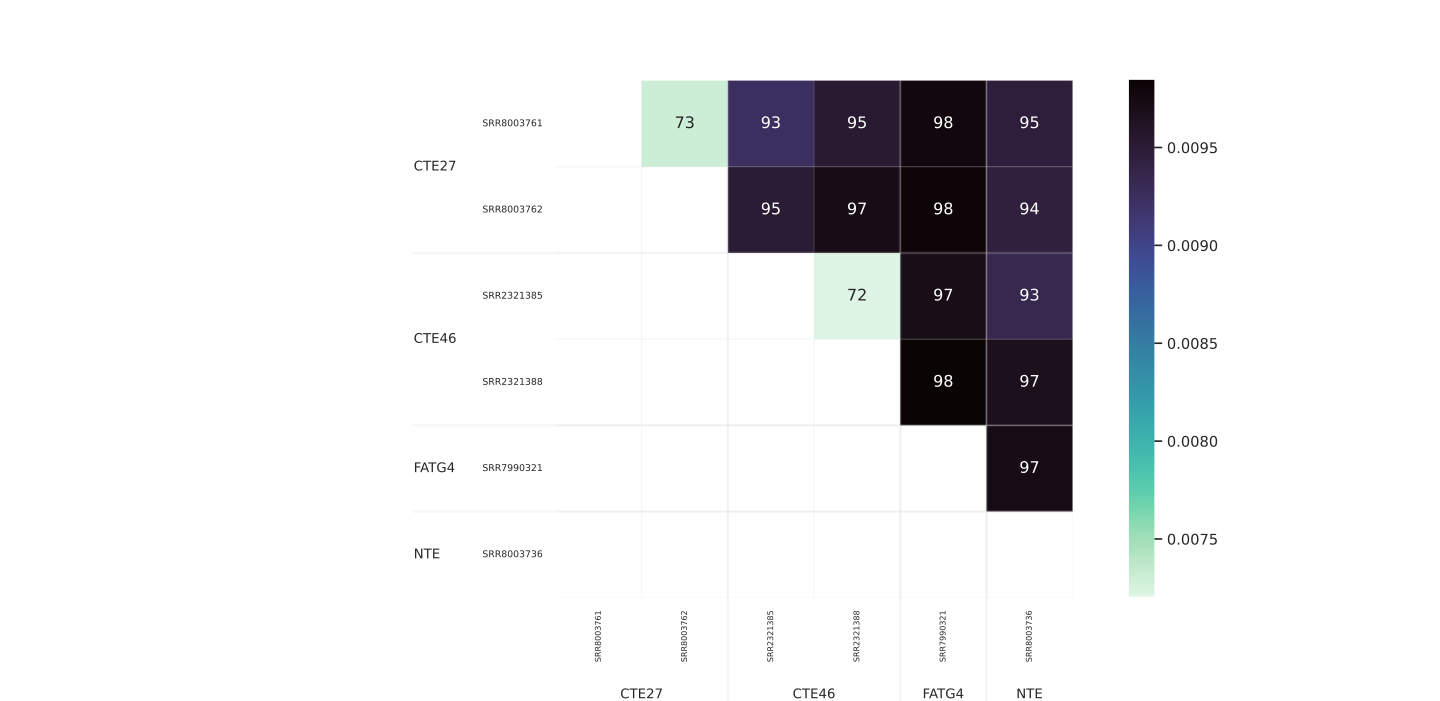
A distance matrix can be visualized in a straightforward fashion via a heatmap. In a heatmap, the elements of the distance matrix are represented by rectangles in a grid. Labels for the rows and columns of the matrix are shown above and to the left of the rows and columns of squares in the heatmap. Each rectangle representing a matrix element is colored according to a colormap, which is also shown with a scale next to the heatmap.
 .
.
RNA-clique offers a draw_heatmap function, which can be found in the
rna_clique.viz.heatmap module. The arguments accepted by draw_heatmap are
summarized in the table below.
| Formal parameter | Description | Default value |
|---|---|---|
mat |
The distance (or similarity) matrix to visualize as a heatmap. | |
sample_metadata |
Sample metadata for sorting and grouping samples in the heatmap. | None |
sample_name_column |
Column of the sample metadata that names each sample. | "name" |
order_by |
Column(s) by which to order samples along the axes of the heatmap. | None |
square |
Whether to draw heatmap cells as squares. | True |
group_by |
Column(s) by which to group samples along the axes of the heatmap. | None |
draw_group_labels |
Whether to draw labels for sample groupings. | False |
make_group_label |
Function to get label for group from group value. | default_group_label_maker |
digit_annot |
Digits of actual value to show within cells, if any. | None |
label_padding_x |
Horizontal padding to add to labels on vertical axis. | 0.0275 |
label_padding_y |
Vertical padding to add to labels on horizontal axis. | 0.0275 |
sort_key |
Function to transform sort column(s). | None |
label_kwargs |
Additional keyword arguments to pass to plt.text for group labels. |
None |
x_label_kwargs |
Additional keyword arguments for labels on vertical axis. | None |
y_label_kwargs |
Additional keyword arguments for labels on horizontal axis. | None |
draw_debug_points |
Whether to draw points useful for debugging drawing code. | False |
Any additional arguments or keyword arguments provided to draw_heatmap will be
passed to Seaborn's
heatmap function,
which is what draw_heatmap uses as a base for its heatmap plots.
RNA-clique's draw_heatmap function assumes that the distance matrix to be
drawn is symmetric, so it only draws the upper triangle of the matrix,
regardless of whether the matrix it is given is actually symmetric.
Samples can be both ordered and grouped by values from the sample_metadata.
When samples are grouped by some columns, those samples that have the same value
for those columns will be adjacent in the rows and columns of the heatmap. When
samples are ordered by some columns, the samples are sorted
according to their values for those columns along the rows and columns of the
heatmap. If samples are ordered by some columns, then they are also grouped by
those columns, but not vice versa. Hence, the group_by columns must always be
a prefix of the order_by columns. If order_by is specified, but group_by
is not, then group_by will be set automatically to order_by.
Vertical and horizontal lines separate groups on the axes of the heatmap. When
draw_group_label is True, labels are also drawn to identify the groups. What
the labels say can be controlled via the make_group_label
function. make_group_label should take the value(s) for a particular group and
return a string to be used as the label for that group. By default, the group
label is simply the value. If there are multiple group_by columns, the then
the value's elements are converted to strings joined with commas and spaces to
get the default group label.
As a supplement to the colormapping, it is sometimes helpful to display digits
of the actual value of a matrix element on top of the heatmap cell for that
element. Since distance values do not typically have short decimal
representations, only a few digits can usually be shown per heatmap cell. The
digit_annot parameter, when specified (not None), shows no more than the
specified number of digits of each value. The value shown in a cell represents
the value of the element in the smallest 1/(10**n) unit such that the largest
value to show needs no more than digit_annot digits. Values shown are rounded
to the nearest unit. For example, if the distances to show are 0.123, 0.012,
and 0.015, displaying with two digits would display values in hundredths,
giving 12, 1, and 2, respectively.
In some cases, it may be desirable to sort the samples by values that don't
appear explicitly in the sample_metadata. The draw_heatmap function supports
such sorting via the sort_key keyword argument. sort_key must be a function
that maps the order_by columns in sample_metadata to other columns to be
used for sorting.
from rna_clique.viz.heatmap import draw_heatmap
from rna_clique.path_to_sample import path_to_sample

sample_metadata: pd.DataFrame = pd.read_csv("my_metadata.csv")
distances: pd.DataFrame = sim.get_dissimilarity_df().rename(
    columns=path_to_sample
).rename(
    rows=path_to_sample
)

# Draw a heatmap with samples grouped and ordered by population and chemotype.
# Display two digit representations of the distances on the cells.
draw_heatmap(
    distances,
    sample_metadata,
    order_by=["population", "chemotype"],
    draw_group_labels=True,
    digit_annot=2,
)
A real example of using draw_heatmap can also be found at
docs/tutorials/reads2tree/make_heatmap.py.
PCoA plots
A Principal Coordinate Analysis (PCoA) plot represents samples as points in a scatter plot. Point coordinates are chosen for the samples such that distances are preserved as well as possible given the number of dimensions allowed.
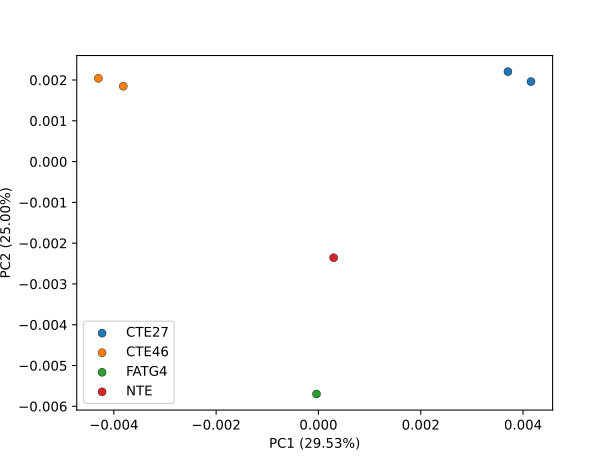
RNA-clique provides the draw_pcoa function for drawing PCoA plots in two or
three dimensions. draw_pcoa is in the rna_clique.viz.pcoa module and returns
a scikit-bio skbio.stats.ordination.OrdinationResults
object representing the results of the PCoA analysis. The parameters accepted by
draw_pcoa are summarized in the table below.
| Formal parameter | Description | Default value |
|---|---|---|
dis_df |
Distance matrix to visualize, as a Pandas DataFrame. | |
sample_metadata |
Sample metadata to use for encoding sample information into the point markers and ellipsoids. | |
group_by |
Columns from sample metadata to encode in point markers and ellipsoids. | |
sample_name_column |
Column containing sample names in sample_metadata. |
"name" |
make_group_label |
Functions mapping group values to text labels to display in legend. | default_group_label_maker |
labelers |
Functions to transform group values before making group labels. | None |
colors |
Colors to use for encoding values of the group_by column. |
None |
legend |
Whether to create a legend. | True |
index_to_kwargs |
Function mapping index among group_by values to keyword arguments to pass to scatter. |
empty_dict |
group_to_kwargs |
Function mapping group_by values to keyword arguments to pass to scatter. |
empty_dict |
index_group_to_kwargs |
Function mapping both index and values for group_by to keyword arguments to pass to scatter. |
empty_dict |
order_by |
Columns on which to order samples (influences order that groups appear in legend). | None |
sort_key |
Functions to transform order_by columns for purposes of sorting. |
None |
ellipsoids |
Whether to draw ellipsoids on the plot. | False |
make_ellipsoid |
Function to create ellipsoid to draw from data for a group. | conf_ellipsoid(0.95) |
ellipsoid_kwargs |
Extra keyword arguments to pass to draw_ellipsoid. |
None |
contribution |
Display relative contributions of principal component axes on axis labels. | True |
annotate |
Label individual points with their sample names. | False |
adjust |
Whether to space out labels automatically using adjustText. |
True |
legend_factors |
Try to separate independent encodings in the legend. | False |
default_legend_marker |
Default kwargs to pass to mpl.lines.Line2D for creating legend entries. |
default_marker_style |
dropna |
Drop rows where the group_by columns have NA values. |
True |
dimensions |
Number of dimensions for the PCoA plot. | 2 |
ax |
matplotlib.axes.Axes on which to draw the plot. |
None |
axis_label_kwargs |
Keyword arguments for creating axis labels. | None |
Although a few of these options are self-explanatory, many of them require further explanation.
group_by
When making a PCoA plot, it is common to want to encode metadata about samples
using various visual variables such as point marker color, shape, opacity,
etc. For example, one might want to encode population with marker shape and
chemotype with marker color. draw_pcoa enables encoding metadata in visual
variables by allowing the caller of the function to specify metadata columns on
which to group samples via the group_by parameter. All samples that have the
same value for all of the columns in group_by form a group. Other parameters
to draw_pcoa can then be used to specify how groups should be drawn
differently.
make_group_label and labelers
The actual values for the group_by columns are not necessarily what you want
displayed in the legend entries corresponding to those values. To allow the
caller to specify arbitrary labels for each group_by columns value,
draw_pcoa allows the caller to specify make_group_label and labelers.
The labelers are functions such that labelers[i] is used to create the label
for the value of column i of group_by. Each element labelers[i] should
accept a value of column i of group_by and should return a string, the label
to use for that value. If a labeler doesn't exist for column i—i.e., if
a labeler is None, or if i >= len(labelers)—then draw_pcoa treats
that column as if its labeler were the identity function.
Each labeler element operates on a value from a single column and returns
a label for that value in that column. The make_group_label function operates
on an iterable of labels for all of the columns in group_by and returns one
final label to use for the group with those individual column
labels. By default, the value for make_group_label is the
default_group_label_maker, which returns the individual labels, joined by
commas and spaces.
colors
The simplest way of specifying how values of the group_by columns should be
encoded via visual variables is by using the colors parameter. As the name
suggests, colors only allows assigning colors to groups, but it provides a
convenient and flexible way of doing so. colors can be a
matplotlib.colors.ListedColormap, a sequence of RGB tuples, or a mapping from
tuples of group_by column values to RGB tuples. In the first two cases,
group_by values are assigned colors sequentially. The first value for the
group_by columns gets the first color. The second value gets the second color,
and so on. In the third case, group_by column values are assigned explicitly
to specific colors via the mapping.
index_to_kwargs, group_to_kwargs, and index_group_to_kwargs
A more flexible (but more cumbersome) way of assigning visual encodings to
group_by values is provided by the index_to_kwargs, group_to_kwargs, and
index_group_to_kwargs parameters. Each of these parameters is a function that
takes some parameter(s) identifying the group_by column values and returns
keyword arguments to pass to matplotlib's scatter function for the samples
in that group. index_to_kwargs, group_to_kwargs, and index_group_to_kwargs
differ in what parameters they should accept.
index_to_kwargs should accept the index of the group_by column value as its
only parameter. index_to_kwargs allows for sequential mappings like those that
are possible by providing the colors parameter with a ListedColormap. For
example, index_to_kwargs might map the first value (index 0) to
{"color": "blue", "marker": "o"} and map the second value (index 1) to
{"color": "red", "marker": "s"} to make the first value blue circles and the
second value red squares.
group_to_kwargs should accept the value of the group_by column itself as
its only parameter. group_to_kwargs allows for explicit mappings like those
that are possible by providing the colors parameter with a Mapping. For
example, group_to_kwargs might map ("location1", "chemotype2") to
{"color": "blue", "marker": "^"}, map ("location2", "chemotype1") to
{"color": "red", "marker": "s"}, and map anything else to
{"color": "gray", "marker": "o"}.
Finally, index_group_to_kwargs should accept both the index and the value of
the group_by column value as its two parameters, in that
order. index_group_to_kwargs is useful when some visual encodings need to be
specified explicitly, but others can be specified by a simple sequences. For
example, you could map ("location1",) and ("location2",) to
{"color": "red"} and {"color": "blue"}, respectively, and have all other
values map to colors corresponding to their index in a ListedColormap.
order_by and sort_key
When legend_factors in not specified, entries in the legend produced by
draw_pcoa appear in the order in which they were drawn on the scatter plot. By
default, this order is the sorted order of the group_by values, but the order
can be changed by providing the order_by parameter to draw_pcoa. When
order_by is provided, all samples are sorted by order_by before drawing,
causing the entries to appear in the order in which their group_by values
appear in the sorted DataFrame. In addition to the columns from the sample
metadata, order_by can be used with the PCoA coordinates of samples. This
feature can be used, for example, to ensure that groups that appear in the
legend in the same vertical order they appear in the plot.
In some cases, it is useful to sort the dataframe by values that do not appear
in the columns of the sample metadata but can be computed from one or more
columns. In that case, the sort_key parameter can be provided. When order_by
is just a single column, sort_key should be a function taking the order_by
column (as a Pandas Series) and returning a new Pandas Series object that will
be used to sort the samples. When order_by is a sequence of multiple columns,
sort_key should be a sequence of functions such that sort_key[i] takes
column order_by[i] and returns a new transformed Series. The dataframe will be
sorted by the transformed Series objects in the order specified by order_by.
ellipsoids and make_ellipsoid
In some cases, it is desirable to draw an ellipsoid for each group_by
group. This behavior can be enabled by providing True to the ellipsoids
parameter. By default, when ellipsoids=True, draw_pcoa will draw a 95%
confidence ellipsoid for the population mean of each group of samples, assuming
the population distribution is multivariate normal. Different ellipsoids can be
drawn by providing a value to the make_ellipsoid parameter. make_ellipsoid
should be a function that accepts a data matrix in which rows represent
individual samples (observations), and columns represent the principal component
dimensions. The function should return an
rna_clique.viz.confidence_ellipsoid.Ellipsoid, which is defined by its center
and vectors representing its axes (one for each dimension). The
rna_clique.viz.confidence_ellipsoid module also contains some functions for
creating such make_ellipsoid functions, including
get_multivariate_normal_density_ellipsoid, which returns an ellipsoid
containing the specific probability density, and
get_multivariate_normal_confidence_ellipsoid, which returns a confidence
ellipsoid at the given level for the population mean.
contribution
When contribution is specified, the relative contribution of each principal
component axis is shown on its axis label. The relative contribution of an axis
is computed as the eigenvalue of that axis divided by the sum of eigenvalues of
all possible axes (including ones greater than the number of dimensions).
annotate and adjust
When the annotate parameter is specified, individual samples will be labeled
with their names from the sample_name_column. Initially, each label is placed
exactly on the point to which it refers, but since this can cause labels to
overlap, the text positions might need to be adjusted. Such adjustment takes
place automatically via adjustText when
the adjust parameter is True (the default); setting adjust=False keeps the
original positions.
legend_factors and default_legend_marker
In some cases, encodings of column might be independent in the sense that the
value of one group_by column completely determines one variable of the visual
encoding, and vice versa, and another column completely determines another
variable, and vice versa. For example, consider the group_by values have the
mapping shown in the table below,
group_by value |
Marker keyword arguments |
|---|---|
('a', '1') |
{"color": "red", "shape": "o"} |
('b', '2') |
{"color": "blue", "shape": "s"} |
('c', '1') |
{"color": "yellow", "shape": "o"} |
('a', '2') |
{"color": "red", "shape": "s") |
('b', '1') |
{"color": "blue", "shape": "o"} |
{'c', '2'} |
{"color": "yellow", "shape": "s"} |
In the example above, the value for the first group_by column determines the
color. When the value is 'a', the color is red. When the value is 'b', the
color is blue, and when the value is 'c', the color is yellow. The value of
the second variable has no impact on the color. Likewise, when the value of the
second variable is '1', the shape is a circle, and when the value is '2',
the shape is a square. The value of the first variable has no impact on shape.
By default, draw_pcoa would make a legend entry for each of the six
combinations of color and shape seen among the samples, but, in this case,
because we have variables that are encoded independently, we can express the
legend more succinctly with just five entries. The five entries would should
that red corresponds to 'a', blue to 'b', and yellow to 'c', and that
circle corresponds to '1' and square to '2'.
draw_pcoa can try to detect such independent variables when the
legend_factors parameter is set to a list of tuples of strings or to True
(equivalent to legend_factors being set to group_by). draw_pcoa will then
display each visual variable's mapping separately. This is accomplished by first
computing what keyword arguments are common to all samples that share values for
each of the provided tuples of columns in legend_factors. For the example
above, if the columns were named alpha and beta, and legend_factors were
set to [('alpha',), ('beta',)], then draw_pcoa would recognize that all
cases where alpha = 'a' are cases where color is mapped to red,
alpha = 'b', blue, and alpha = 'c', yellow. Likewise, it would recognize
that all cases where beta = '1' are cases where shape is mapped to o, and
all cases where beta = '2' are cases where shape is mapped to s.
The legend is then drawn one set of columns in legend_factors at a time; each
value for each set of columns is shown next to a marker using the shared set of
keyword arguments common to all samples with that value for that set of
columns. For the example above, 'a' would be shown next to a red marker, 'b'
next to blue, and 'c' next to yellow. Then, '1' would be shown next to a
circle, and '2' would be shown next to a square.
Since a marker must have some value for the unspecified visual variables,
default values for those variables can be specified via
default_legend_marker. For example, the red marker shown in the example above
could not simply be a red marker—it would also have to have a shape,
opacity, etc. default_legend_marker allows you to specify those default
variables.
Since draw_pcoa's behavior when legend_factors=True is simply based on
analyzing the provided mappings from group_by values to scatter keyword
arguments, it may sometimes give unexpected results, splitting variables that
are only coincidentally independent, or failing to split variables when certain
combinations of values are always observed together.
from rna_clique.viz.pcoa import draw_pcoa

# Create a PCoA plot ...
res: skbio.stats.ordination.OrdinationResults = draw_pcoa(
   sim.get_dissimilarity_df(),
   sample_metadata,
   # Group samples by location and chemotype.
   ["location", "chemotype"],
   "sample_name",
   # Samples in place1 with chemotype lolC- should be red. Everything else just
   # gets its color from the tab10 colormap.
   index_group_to_kwargs=lambda i, x: {
           ("place1", "lolC-"): {"color": "red"}
   }.get(
        x,
        {"color": matplotlib.colormaps.get("tab10").colors[i]}
   ),
   # Draw 95% confidence ellipsoids for population mean.
   ellipsoids=True
)
A real example of using draw_pcoa can also be found at
../tutorials/reads2tree/make_pcoa.py.
Phylograms
RNA-clique provides functions for drawing phylograms in the
rna_clique.viz.phylo_utils module. Unlike the functions for heatmaps and PCoA
plots, the functions for phylograms expect to be given a BioPython Tree instead
of a distance matrix. Such trees can be constructed using BioPython or some
other Python libraries.
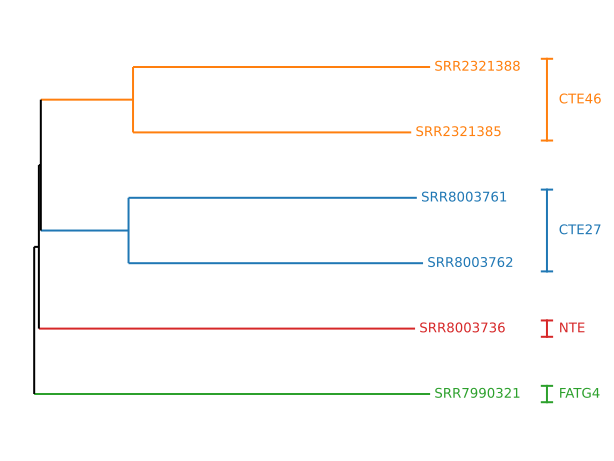
The main function for drawing phylograms is the draw_tree function in the
rna_clique.viz.phylo_utils module. The parameters that the function accepts
are described in the table below.
| Formal parameter | Description | Default value |
|---|---|---|
tree |
The phylogenetic tree for which to draw a phylogram. | |
blank_nonterminals |
Whether to set non-terminal labels to empty string. | True |
clades |
Mapping from values to clades to be colored. | None |
colors |
Sequence or mapping specifying colors of clades. | None |
ax |
Axes on which to draw. | None |
The least straightforward of these parameters are clades and
colors. Together, the two parameters allow you to define how certain clades
should be colored. clades should map some values identifying clades (clade
names, for example) to the clades they identify.
colors can either be a matplotlib.colors.ListedColormap, a sequence of RGB
values, or a mapping to RGB values. In the first two cases, the clades will
simply be assigned values from the colormap or the sequence in the order they
appear in the clades dict. In the last case, each key-value pair specifies
that the clade associated with the same key in the clades dict should be
colored as specified by the value in the colors dict.
get_clades
It is sometimes desirable to find and color maximal clades such that all samples
in the clade have some metadata value, and all samples that have that metadata
value fall in that clade. To find such clades to be colored, you can use the
get_clades function from the rna_clique.viz.phylo_utils module.
get_clades returns the axes on which the tree was drawn. The parameters
accepted by get_clades are described below.
| Formal parameter | Description |
|---|---|
tree |
The tree in which to find clades. |
sample_metadata |
The metadata associated with the samples (nonterminals). |
sample_name_column |
Column of sample_metadata containing sample names. |
group_by |
Columns of metadata for which to find clades. |
import Bio.Phylo
import Bio.Phylo
from Bio.Phylo.TreeConstruction import DistanceTreeConstructor, DistanceMatrix
from rna_clique.viz.phylo_utils import tril_jagged, draw_tree, get_clades
from rna_clique.path_to_sample import path_to_sample

# Convert RNA-clique distance matrix to a
# Bio.Phylo.TreeConstruction.DistanceMatrix.
phylo_dis_mat = DistanceMatrix(
    [path_to_sample(x) for x in sim.samples],
    tril_jagged(sim.get_dissimilarity_matrix())
)
# Build a tree from the distance matrix using neighbor-joining algorithm.
constructor = DistanceTreeConstructor()
tree = constructor.nj(phylo_dis_mat)
# Get clades by population.
clades = get_clades(tree, sample_metadata, "sample_name", ["population"])
# Draw the tree, coloring maximal clades containing only and all samples from
# a given population.
ax = draw_tree(
    tree,
    clades=clades,
    colors=matplotlib.colormaps.get("tab10")
)
draw_clade_labels
BioPython can draw clade labels directly on nonterminals of the tree when the
nonterminal is labeled via its name attribute, but the author of RNA-clique
has found that labels are often better shown using "calipers"/"braces" on the
side of the plot. To draw clade labels with calipers, you can use the
draw_clade_labels function in the rna_clique.viz.phylo_utils module.
The parameters accepted by draw_clade_labels are shown below.
| Formal parameter | Description | Default value |
|---|---|---|
ax |
matplotlib.axes.Axes on which to draw the labels. |
|
clades |
Clades for which to draw labels. | |
colors |
Sequence or mapping specifying how to color clade labels. | |
line_padding |
Horizontal padding for calipers. | 0.036 |
cap_width |
Width of horizontal "caps" on calipers. | 0.02 |
text_padding |
Horizontal padding on text labels next to calipers. | 0.023 |
make_label |
Function to make clade label from key in clades. |
id_ |
clades and colors work as they do in draw_tree. clades maps some keys
identifying clades to the clades themselves, and colors maps those same keys
to the colors of the clades.
If you don't want the key in the clades dict to be the label shown on the
plot for that clade, use the make_label parameter. By default, the
make_label parameter is set to an identity function, so the displayed labels
are exactly the keys in the clades dict.
from matplotlib import pyplot as plt
from rna_clique.viz.phylo_utils import make_clade_labels

# Make clade labels using the same clades and colors passed to draw_tree.
# Labels should be in all caps.
make_clade_labels(
    ax,
    clades,
    colors,
    make_label=str.upper
1)
A real example of using draw_tree can also be found at
../tutorials/reads2tree/make_tree.py.